> ## Documentation Index
> Fetch the complete documentation index at: https://moengage-add-partner-guide-reddit-ads-conversions.mintlify.site/llms.txt
> Use this file to discover all available pages before exploring further.

# Set up MoEngage activity in SFMC

> Install and configure MoEngage custom activities, CloudPages, and Data Extensions in Salesforce Marketing Cloud so you can use MoEngage Push and Event activities in Journey Builder.

## Introduction

This guide provides detailed instructions for setting up MoEngage Custom Activities in Salesforce Marketing Cloud (SFMC). Follow these steps to ensure a smooth integration and usage.

<Info>
  **Prerequisites**

  * Salesforce Marketing Cloud Access: Administrator and Marketing Cloud Administrator permissions are required.
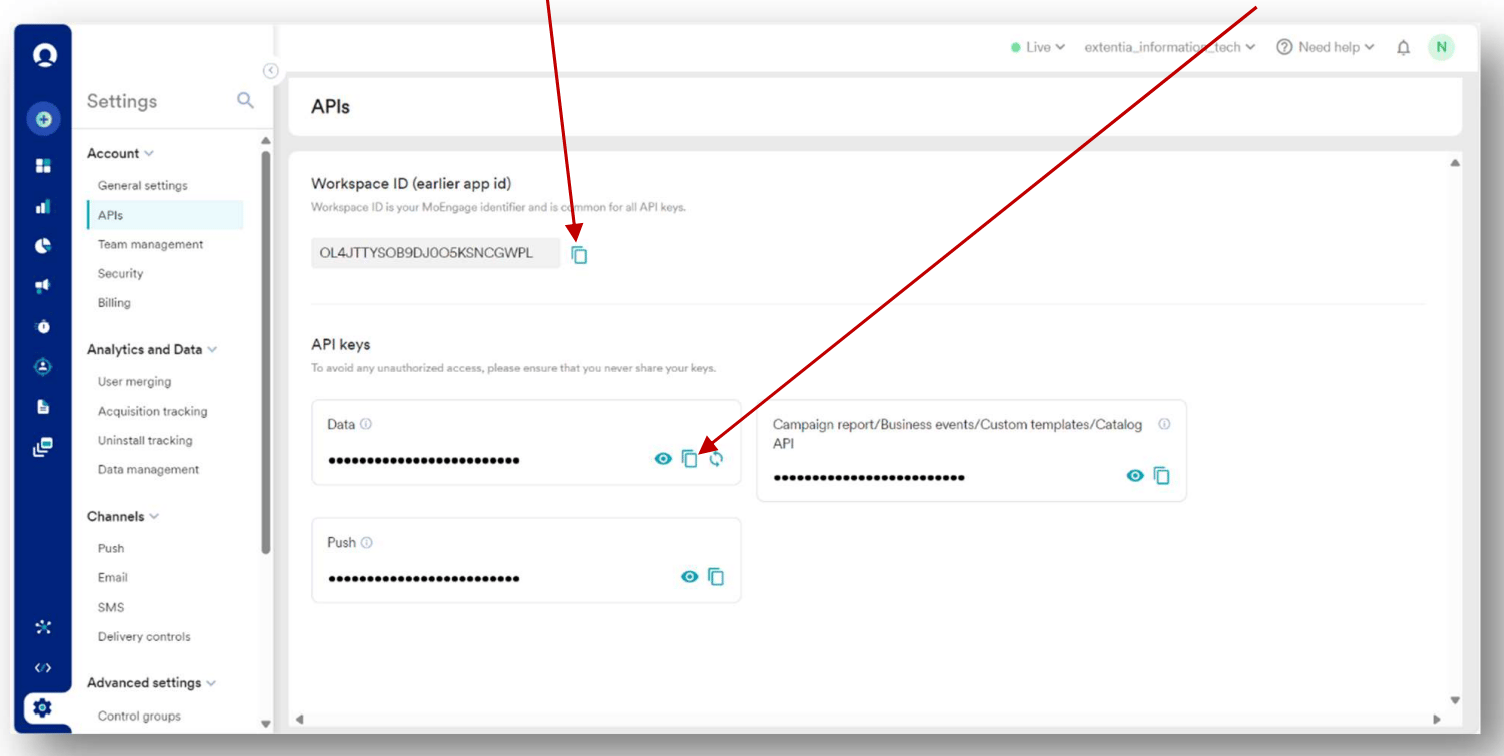
  * MoEngage API Credentials: Ensure you have access to your MoEngage APIs (Settings > Accounts > APIs).
</Info>

## Step 1: Set up MoEngage custom activity

To set up the MoEngage custom activity, perform the following steps:

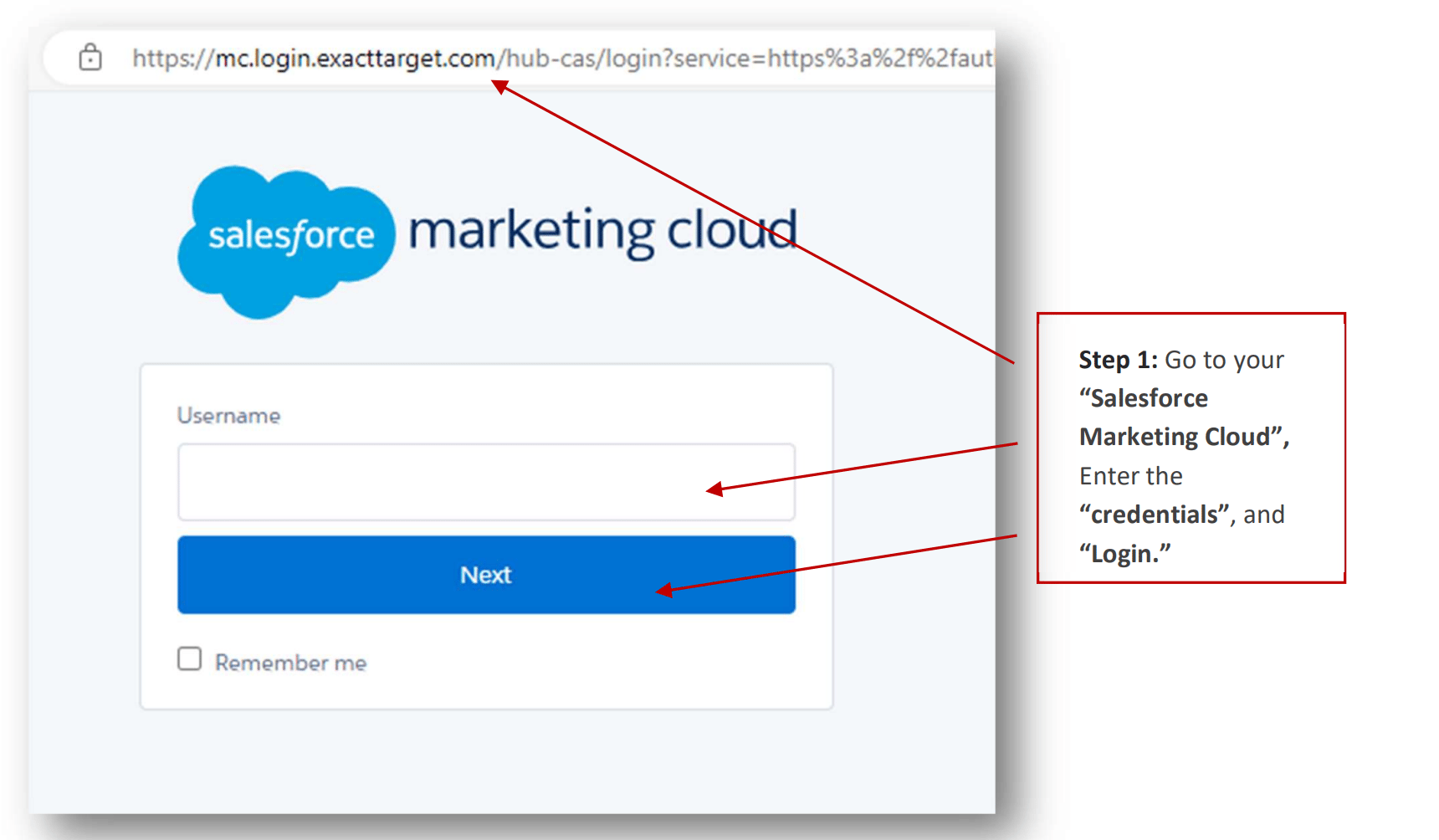
1. Log in to your Salesforce Marketing Cloud (SFMC).
   <img src="https://mintcdn.com/moengage-add-partner-guide-reddit-ads-conversions/Yi-RyjDepSuwBh9c/images/partner_36576006441364.png?fit=max&auto=format&n=Yi-RyjDepSuwBh9c&q=85&s=dd0f1da6a0134295c698cb9e1849b774" alt="Salesforce Marketing Cloud login screen" width="1720" height="1004" data-path="images/partner_36576006441364.png" />

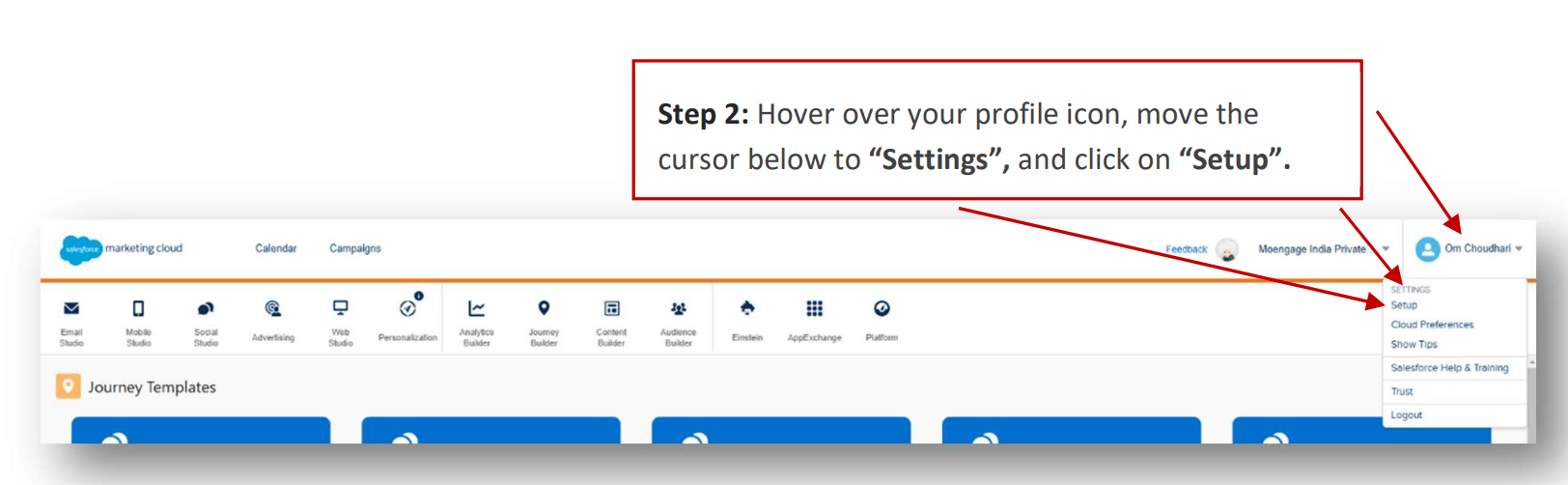
2. Access SFMC settings.

   <img src="https://mintcdn.com/moengage-add-partner-guide-reddit-ads-conversions/Yi-RyjDepSuwBh9c/images/partner_36576006441620.png?fit=max&auto=format&n=Yi-RyjDepSuwBh9c&q=85&s=87e434437cd54ba1dcbef3de5a9edf29" alt="Accessing SFMC settings from the dashboard" width="1624" height="502" data-path="images/partner_36576006441620.png" />

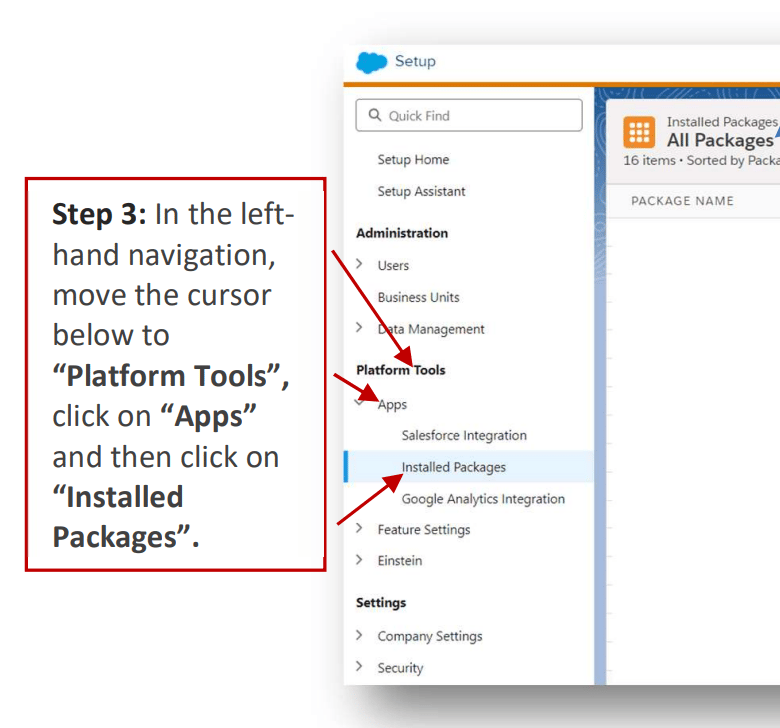
3. Once you click on "Installed Packages", this tab will be visible on the right side of the page.
   <img src="https://mintcdn.com/moengage-add-partner-guide-reddit-ads-conversions/Yi-RyjDepSuwBh9c/images/partner_36576013645972.png?fit=max&auto=format&n=Yi-RyjDepSuwBh9c&q=85&s=5bebee400b17803370029cf3275328f4" alt="Installed Packages tab in SFMC settings" width="780" height="728" data-path="images/partner_36576013645972.png" />

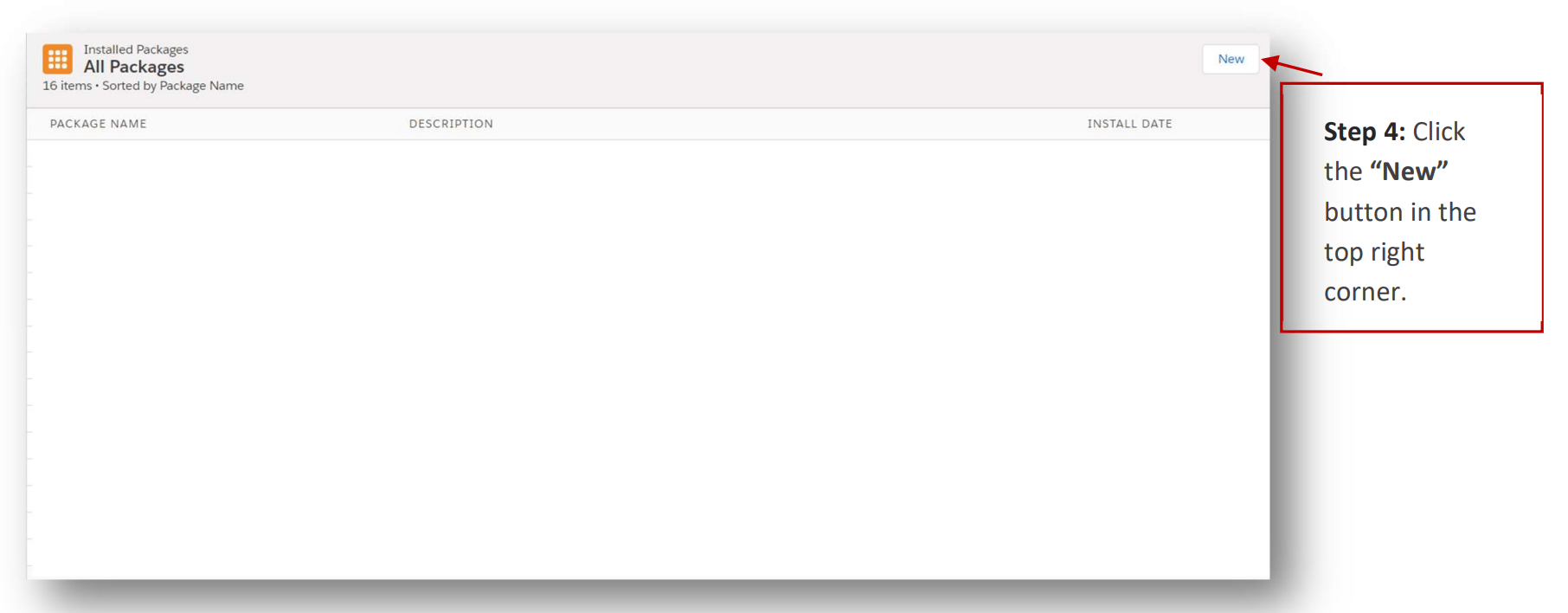
4. Create a new package.

   <img src="https://mintcdn.com/moengage-add-partner-guide-reddit-ads-conversions/Yi-RyjDepSuwBh9c/images/partner_36576013646228.png?fit=max&auto=format&n=Yi-RyjDepSuwBh9c&q=85&s=386be95b7eca182cf07f3b2d162e281e" alt="Creating a new package in SFMC Installed Packages" width="1812" height="708" data-path="images/partner_36576013646228.png" />

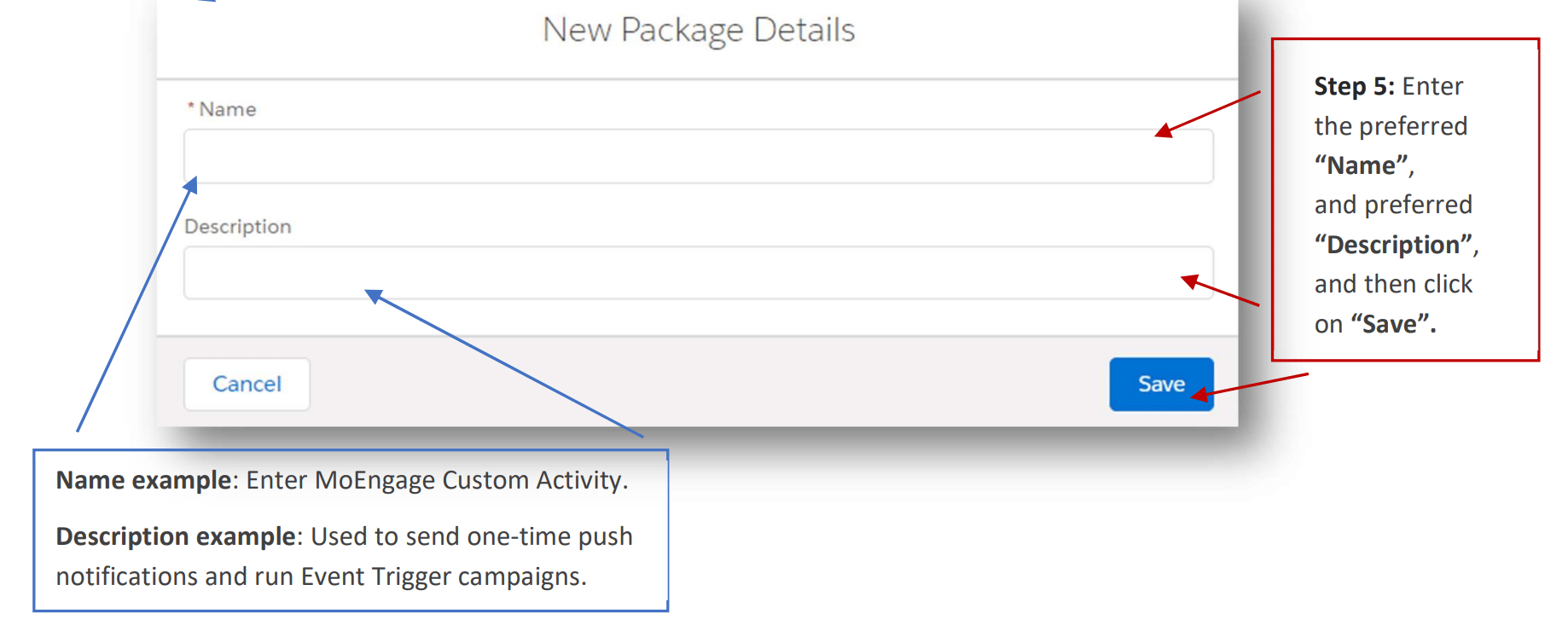
5. Add package details. You can name it "MoEngage Custom Activity" and add description as "Used to send one-time push notifications and run Event Trigger campaigns".
   <img src="https://mintcdn.com/moengage-add-partner-guide-reddit-ads-conversions/Yi-RyjDepSuwBh9c/images/partner_36576013646484.png?fit=max&auto=format&n=Yi-RyjDepSuwBh9c&q=85&s=f1907ba4398603c66e6ea28bc0e6fb0e" alt="Entering name and description for the MoEngage Custom Activity package" width="1838" height="740" data-path="images/partner_36576013646484.png" />

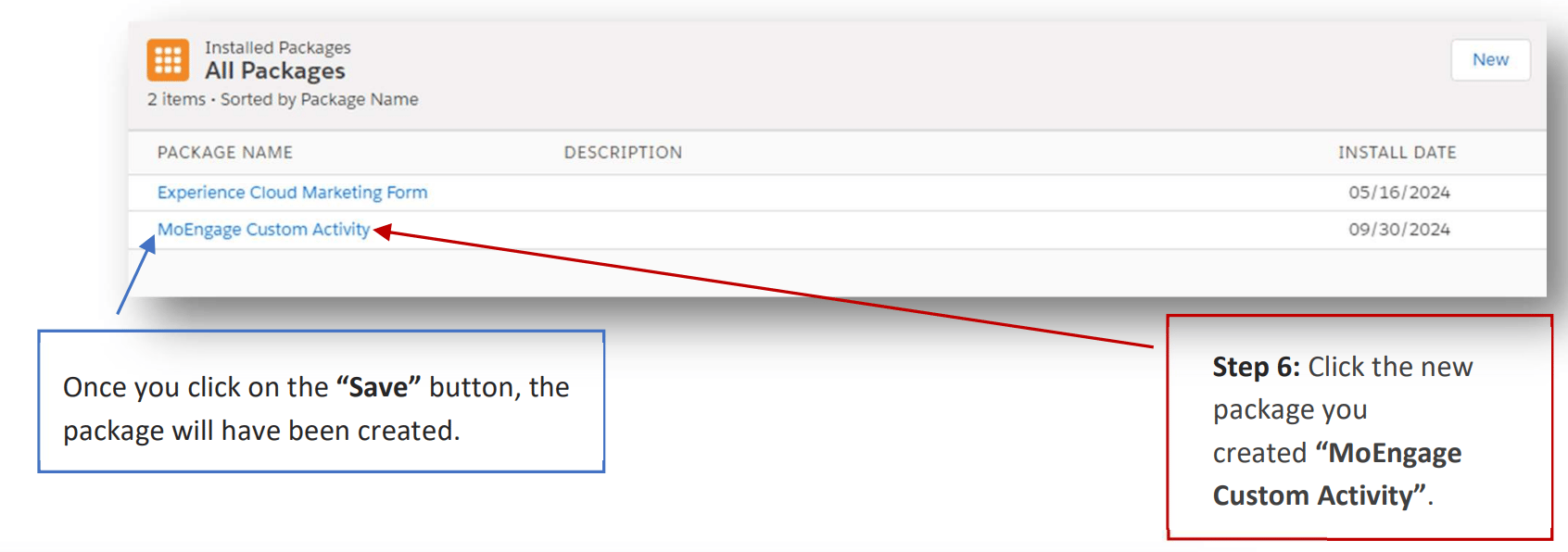
6. Add MoEngage Components.

   <img src="https://mintcdn.com/moengage-add-partner-guide-reddit-ads-conversions/Yi-RyjDepSuwBh9c/images/partner_36576006447124.png?fit=max&auto=format&n=Yi-RyjDepSuwBh9c&q=85&s=e630f5eefe5024a597bd535f35cc19cc" alt="Adding MoEngage Components to the package" width="1692" height="596" data-path="images/partner_36576006447124.png" />

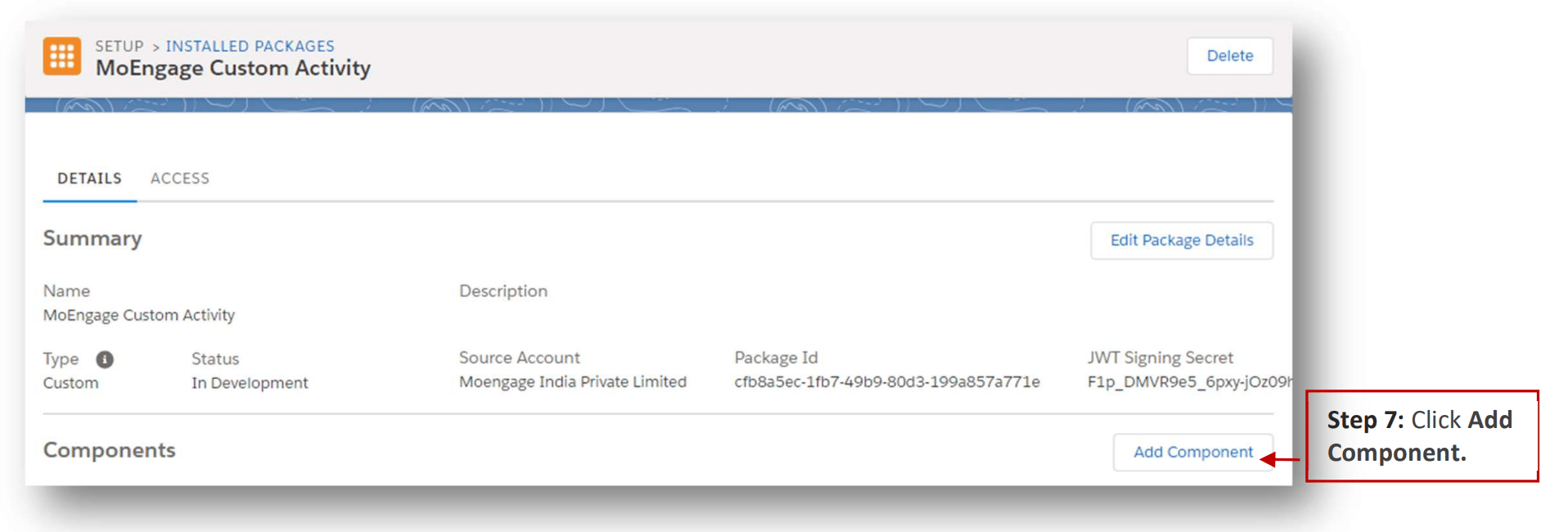
7. Click Add Component.

   <img src="https://mintcdn.com/moengage-add-partner-guide-reddit-ads-conversions/Yi-RyjDepSuwBh9c/images/partner_36576006447636.png?fit=max&auto=format&n=Yi-RyjDepSuwBh9c&q=85&s=560b75e6fd51081c89cd60cbca3cfd1d" alt="Add Component button in SFMC package configuration" width="1916" height="650" data-path="images/partner_36576006447636.png" />

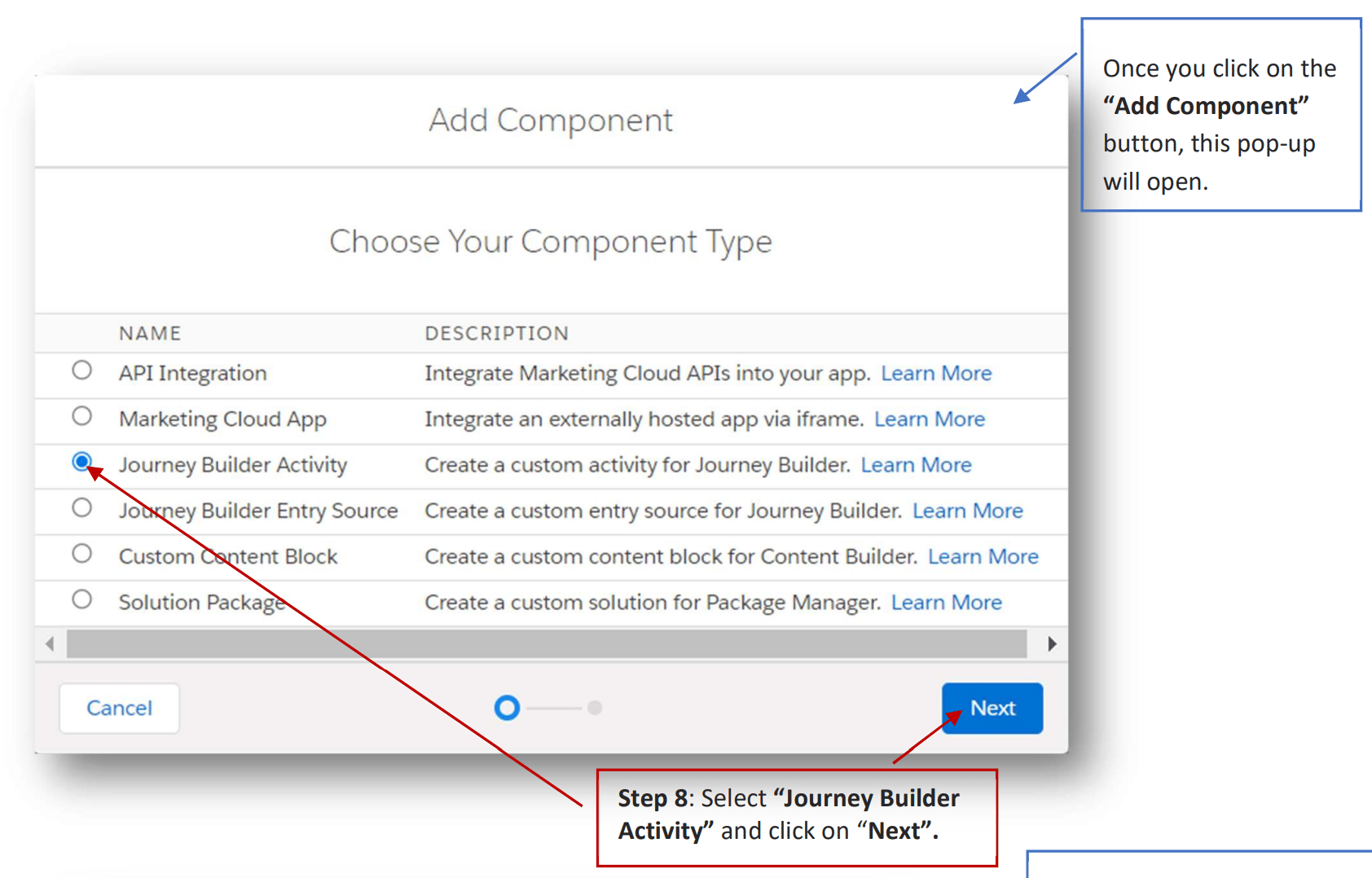
8. Select "Journey Builder Activity" and click on "Next".
   <img src="https://mintcdn.com/moengage-add-partner-guide-reddit-ads-conversions/Yi-RyjDepSuwBh9c/images/partner_36576006447764.png?fit=max&auto=format&n=Yi-RyjDepSuwBh9c&q=85&s=461b6ddb18adbe6f7521f7f7d04fe951" alt="Selecting Journey Builder Activity as the component type" width="1684" height="1078" data-path="images/partner_36576006447764.png" />

9. Click Save.

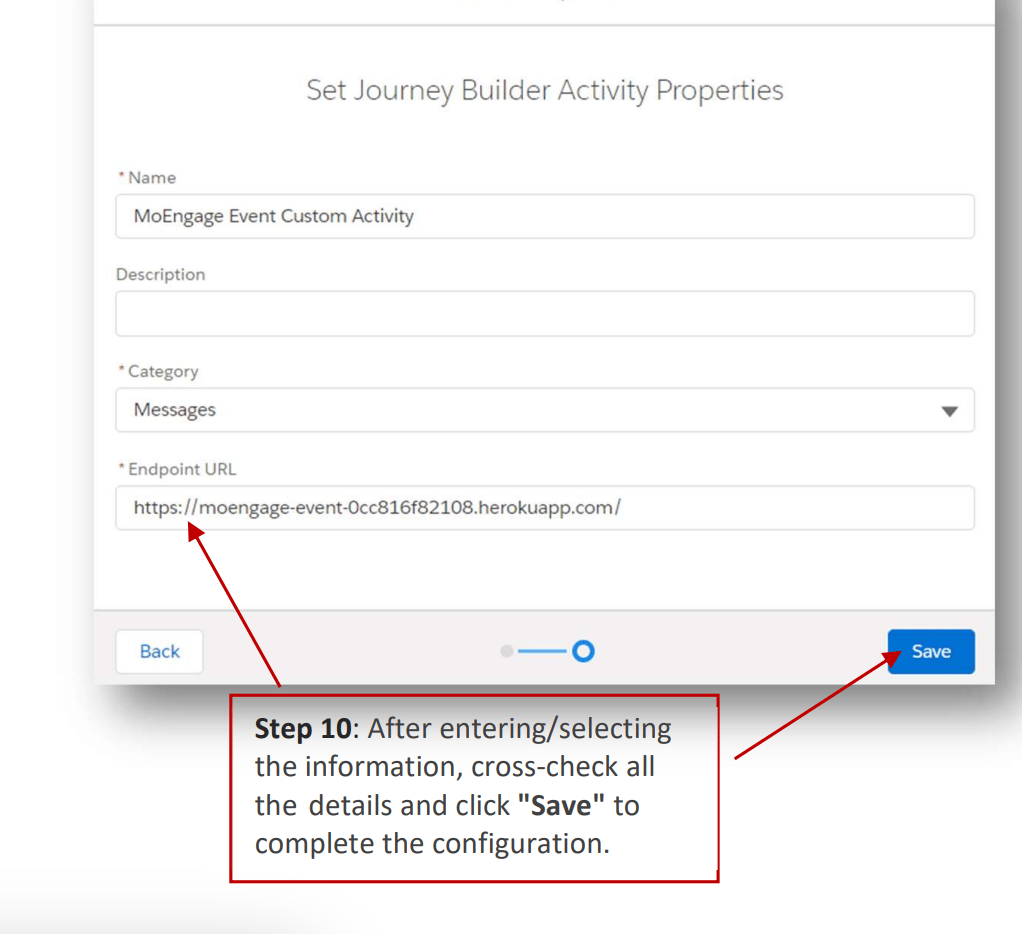
10. Repeat the same steps for MoEngage Event Destination.
    <img src="https://mintcdn.com/moengage-add-partner-guide-reddit-ads-conversions/Yi-RyjDepSuwBh9c/images/partner_36576013650708.png?fit=max&auto=format&n=Yi-RyjDepSuwBh9c&q=85&s=56e2b3c61eb4c02fffceb454711f2b0b" alt="Adding MoEngage Event Destination component" width="1022" height="934" data-path="images/partner_36576013650708.png" />

## Step 2: Set up the Cloud Page and the Data Extension

You need to set up a cloud page along with a data extension to capture the MoEngage workspace details. These can then be used while configuring a MoEngage destination in Journey Builder:

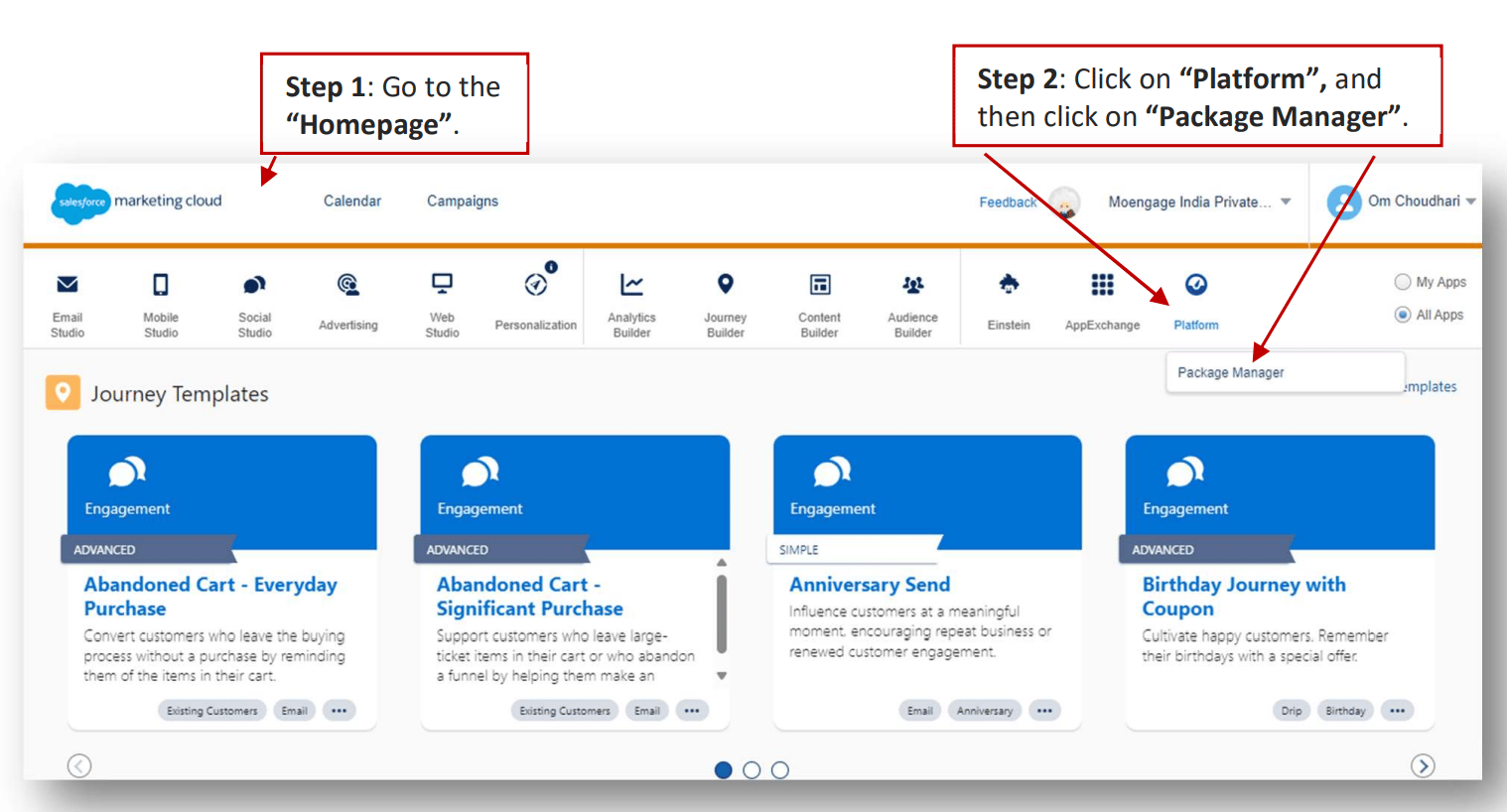
1. Navigate to the SFMC Home page.

2. Click "Platform" > "Package Manager".
   <img src="https://mintcdn.com/moengage-add-partner-guide-reddit-ads-conversions/Yi-RyjDepSuwBh9c/images/partner_36576006448404.png?fit=max&auto=format&n=Yi-RyjDepSuwBh9c&q=85&s=0a8af751a96109bb7ead6540a91aebb2" alt="Navigating to Platform > Package Manager in SFMC" data-og-width="1518" width="1518" data-og-height="818" height="818" data-path="images/partner_36576006448404.png" data-optimize="true" data-opv="3" srcset="https://mintcdn.com/moengage-add-partner-guide-reddit-ads-conversions/Yi-RyjDepSuwBh9c/images/partner_36576006448404.png?w=280&fit=max&auto=format&n=Yi-RyjDepSuwBh9c&q=85&s=20a94444e835e6b427ab36219401a2ef 280w, https://mintcdn.com/moengage-add-partner-guide-reddit-ads-conversions/Yi-RyjDepSuwBh9c/images/partner_36576006448404.png?w=560&fit=max&auto=format&n=Yi-RyjDepSuwBh9c&q=85&s=b0cb35bfe04c93e265f49d06fc351254 560w, https://mintcdn.com/moengage-add-partner-guide-reddit-ads-conversions/Yi-RyjDepSuwBh9c/images/partner_36576006448404.png?w=840&fit=max&auto=format&n=Yi-RyjDepSuwBh9c&q=85&s=5a2a936dd5177e7621721a78d0b4f8b9 840w, https://mintcdn.com/moengage-add-partner-guide-reddit-ads-conversions/Yi-RyjDepSuwBh9c/images/partner_36576006448404.png?w=1100&fit=max&auto=format&n=Yi-RyjDepSuwBh9c&q=85&s=5f882ecf66e5b010bbe629e9f7435522 1100w, https://mintcdn.com/moengage-add-partner-guide-reddit-ads-conversions/Yi-RyjDepSuwBh9c/images/partner_36576006448404.png?w=1650&fit=max&auto=format&n=Yi-RyjDepSuwBh9c&q=85&s=606d2a5620c434734ae912a380cb9389 1650w, https://mintcdn.com/moengage-add-partner-guide-reddit-ads-conversions/Yi-RyjDepSuwBh9c/images/partner_36576006448404.png?w=2500&fit=max&auto=format&n=Yi-RyjDepSuwBh9c&q=85&s=0408bdba81f6b35f1009f35f6af256a8 2500w" />

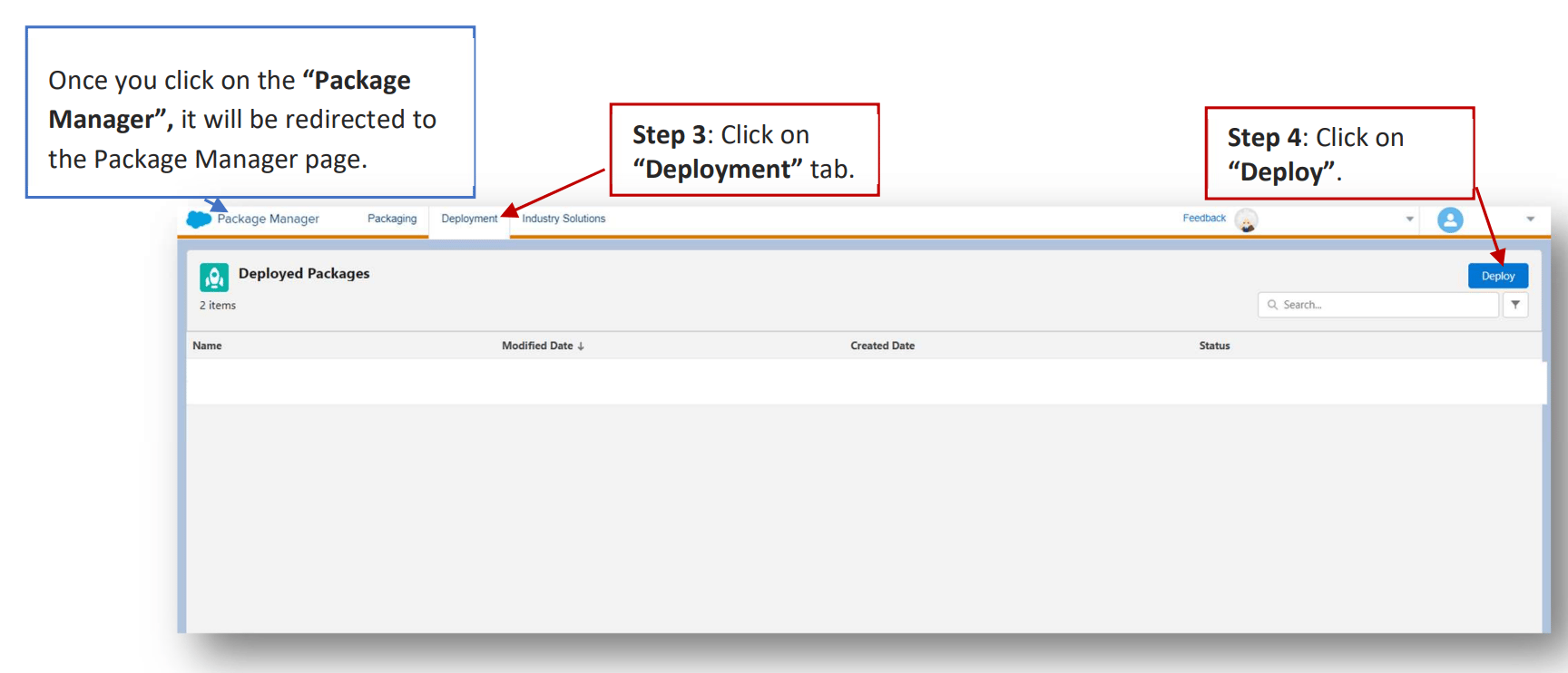
   Once you click on the "Package Manager", it will be redirected to the Package Manager page.

3. Click on the "Deployment" tab.

4. Click "Deploy".
   <img src="https://mintcdn.com/moengage-add-partner-guide-reddit-ads-conversions/Yi-RyjDepSuwBh9c/images/partner_36576013651476.png?fit=max&auto=format&n=Yi-RyjDepSuwBh9c&q=85&s=bd5b3a5a0fc9b3b1ac93b7a1e47e7dcc" alt="Deployment tab and Deploy button in Package Manager" width="1728" height="742" data-path="images/partner_36576013651476.png" />

5. Upload the MoEngage solution package [JSON file](https://partners.moengage.com/hc/en-us/article_attachments/45740967830932).
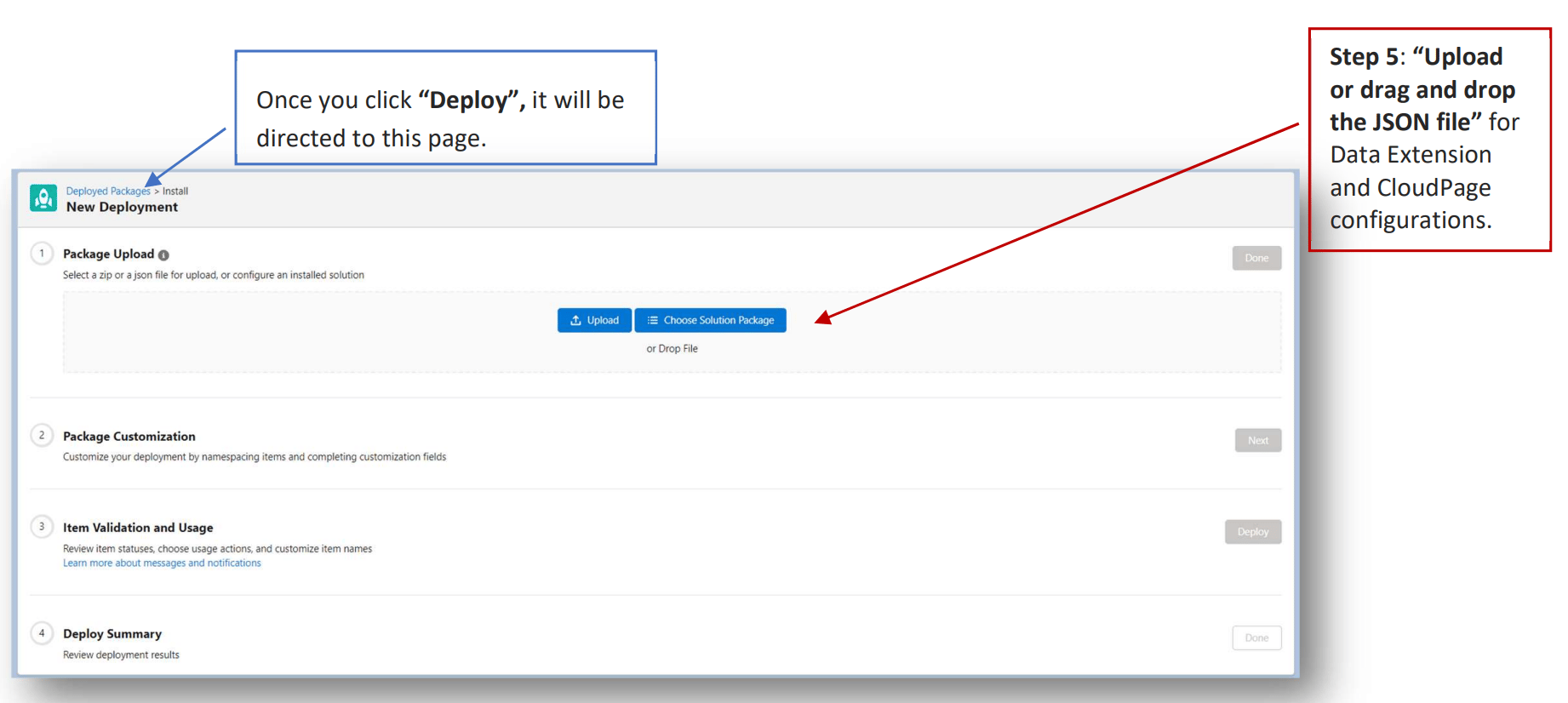
   <img src="https://mintcdn.com/moengage-add-partner-guide-reddit-ads-conversions/Yi-RyjDepSuwBh9c/images/partner_36576013651860.png?fit=max&auto=format&n=Yi-RyjDepSuwBh9c&q=85&s=95ae061fe33e917365e2be6370797196" alt="Uploading the MoEngage solution package JSON" width="1842" height="826" data-path="images/partner_36576013651860.png" />

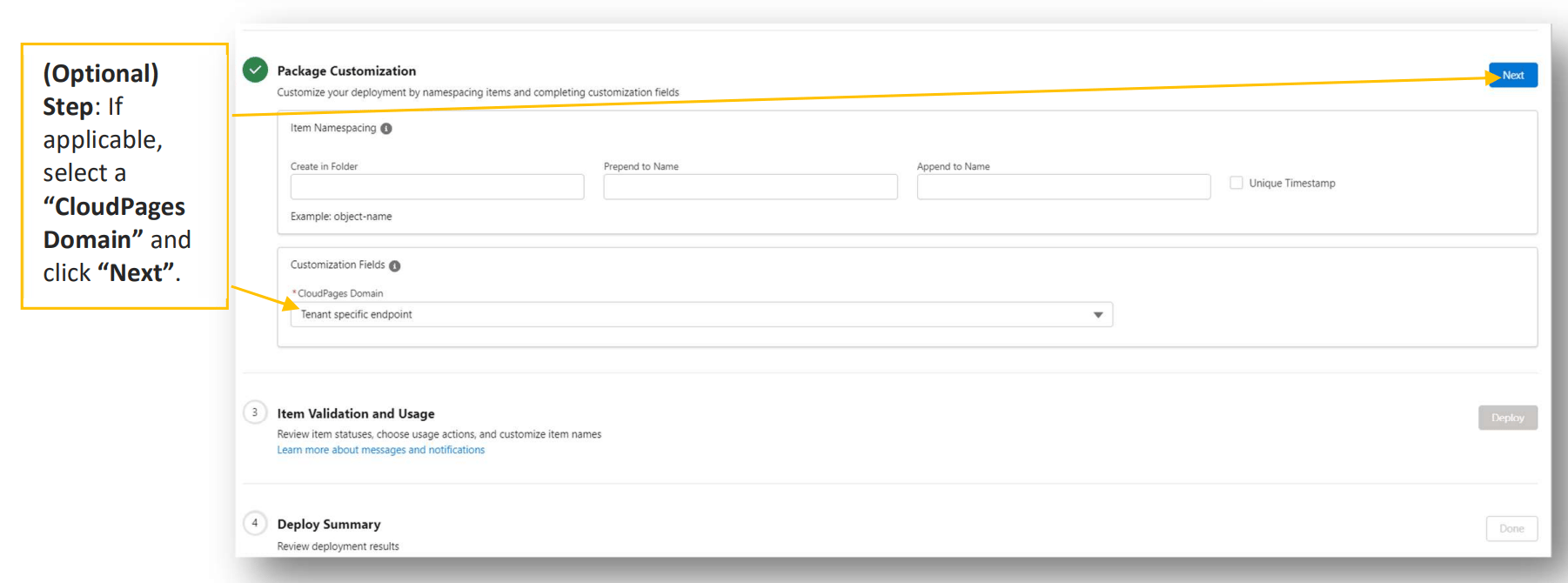
   \[Optional] If applicable, select a "CloudPages Domain" and click "Next".
   <img src="https://mintcdn.com/moengage-add-partner-guide-reddit-ads-conversions/Yi-RyjDepSuwBh9c/images/partner_36576006449428.png?fit=max&auto=format&n=Yi-RyjDepSuwBh9c&q=85&s=d1dff07289fd90841f738399197b8688" alt="Selecting an optional CloudPages Domain during deployment" width="1802" height="670" data-path="images/partner_36576006449428.png" />

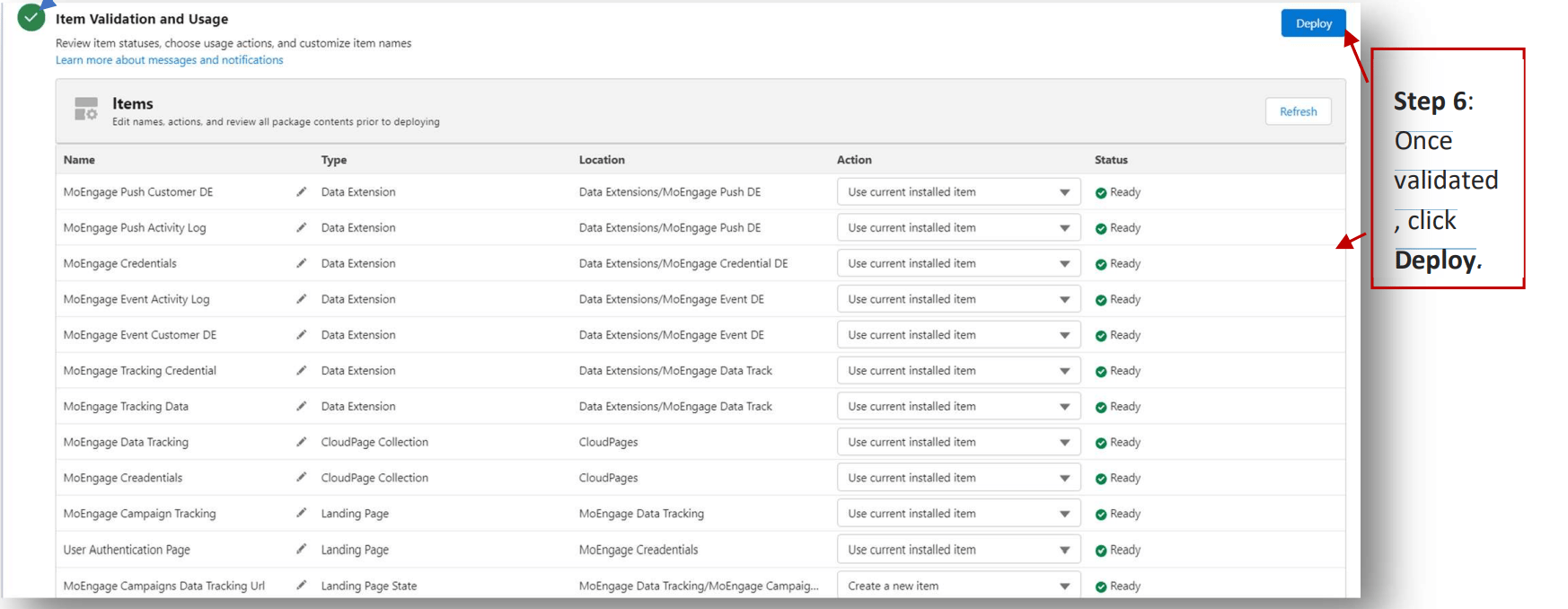
6. The system will validate the setup and check for any issues. Once validated, click Deploy.
   <img src="https://mintcdn.com/moengage-add-partner-guide-reddit-ads-conversions/Yi-RyjDepSuwBh9c/images/partner_36576006449556.png?fit=max&auto=format&n=Yi-RyjDepSuwBh9c&q=85&s=9a4e67718a3a51889ccd48b0bddc2c23" alt="Validating and clicking Deploy in Package Manager" width="1746" height="678" data-path="images/partner_36576006449556.png" />

### Publish Data Extensions and CloudPages

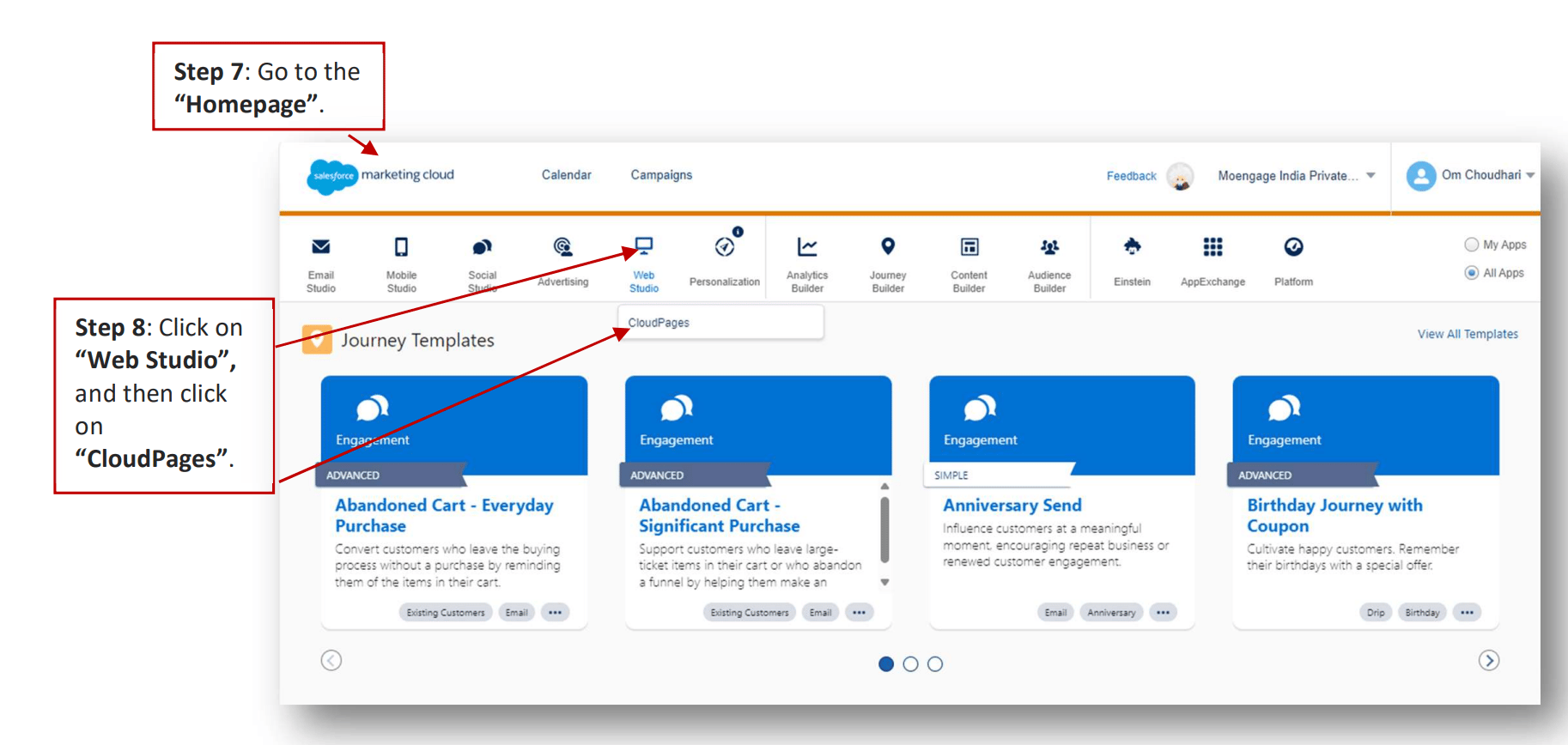
7. Go to the "Homepage".

8. Click on "Web Studio", and then click on "CloudPages".
   <img src="https://mintcdn.com/moengage-add-partner-guide-reddit-ads-conversions/Yi-RyjDepSuwBh9c/images/partner_36576006449684.png?fit=max&auto=format&n=Yi-RyjDepSuwBh9c&q=85&s=2085818801bd91e6735b7a65e3faf088" alt="Navigating to Web Studio > CloudPages" data-og-width="1826" width="1826" data-og-height="868" height="868" data-path="images/partner_36576006449684.png" data-optimize="true" data-opv="3" srcset="https://mintcdn.com/moengage-add-partner-guide-reddit-ads-conversions/Yi-RyjDepSuwBh9c/images/partner_36576006449684.png?w=280&fit=max&auto=format&n=Yi-RyjDepSuwBh9c&q=85&s=e9c9b69b8127dbfbff7d57efb2f273af 280w, https://mintcdn.com/moengage-add-partner-guide-reddit-ads-conversions/Yi-RyjDepSuwBh9c/images/partner_36576006449684.png?w=560&fit=max&auto=format&n=Yi-RyjDepSuwBh9c&q=85&s=a32eb9824fb2a744745b8536de5308de 560w, https://mintcdn.com/moengage-add-partner-guide-reddit-ads-conversions/Yi-RyjDepSuwBh9c/images/partner_36576006449684.png?w=840&fit=max&auto=format&n=Yi-RyjDepSuwBh9c&q=85&s=7a685c46071557e7a69dc0b6e3d70823 840w, https://mintcdn.com/moengage-add-partner-guide-reddit-ads-conversions/Yi-RyjDepSuwBh9c/images/partner_36576006449684.png?w=1100&fit=max&auto=format&n=Yi-RyjDepSuwBh9c&q=85&s=1a0a9b91c31cda6b9079a6c2abe19cff 1100w, https://mintcdn.com/moengage-add-partner-guide-reddit-ads-conversions/Yi-RyjDepSuwBh9c/images/partner_36576006449684.png?w=1650&fit=max&auto=format&n=Yi-RyjDepSuwBh9c&q=85&s=62404247fa7daa7bb266c320682ad550 1650w, https://mintcdn.com/moengage-add-partner-guide-reddit-ads-conversions/Yi-RyjDepSuwBh9c/images/partner_36576006449684.png?w=2500&fit=max&auto=format&n=Yi-RyjDepSuwBh9c&q=85&s=53aadf9d671c0e6f6c9086b5fe88cca1 2500w" />

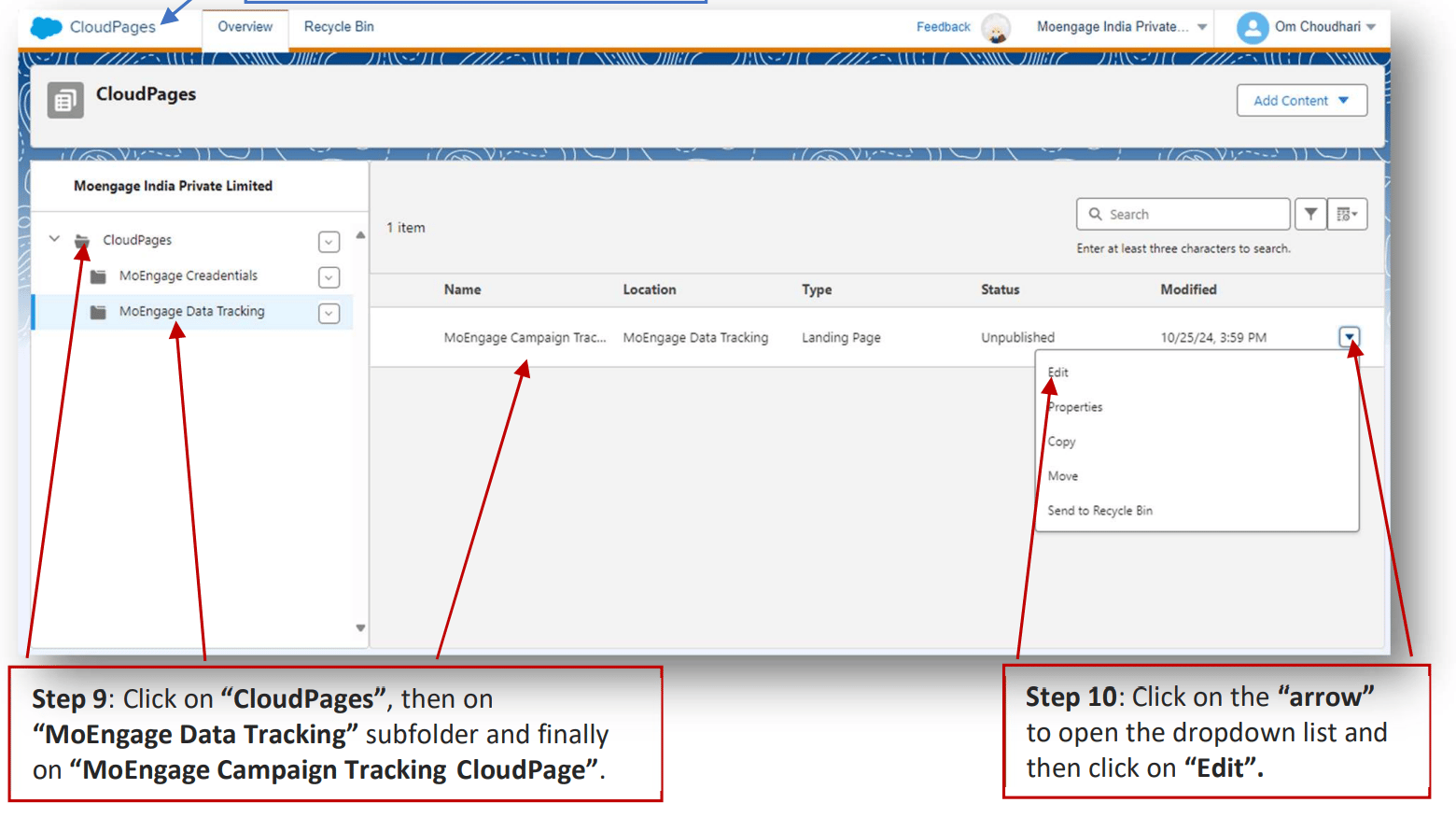
9. Once you click "CloudPages", it will be directed to this page. Click on "CloudPages", then on "MoEngage Data Tracking" subfolder, and finally on "MoEngage Campaign Tracking CloudPage".

10. Click on the "arrow" to open the dropdown list and then click on "Edit".
    <img src="https://mintcdn.com/moengage-add-partner-guide-reddit-ads-conversions/Yi-RyjDepSuwBh9c/images/partner_36576013658644.png?fit=max&auto=format&n=Yi-RyjDepSuwBh9c&q=85&s=e352e25b5a561a0d5a145c3031bb1246" alt="Editing the MoEngage Campaign Tracking CloudPage" width="1560" height="890" data-path="images/partner_36576013658644.png" />

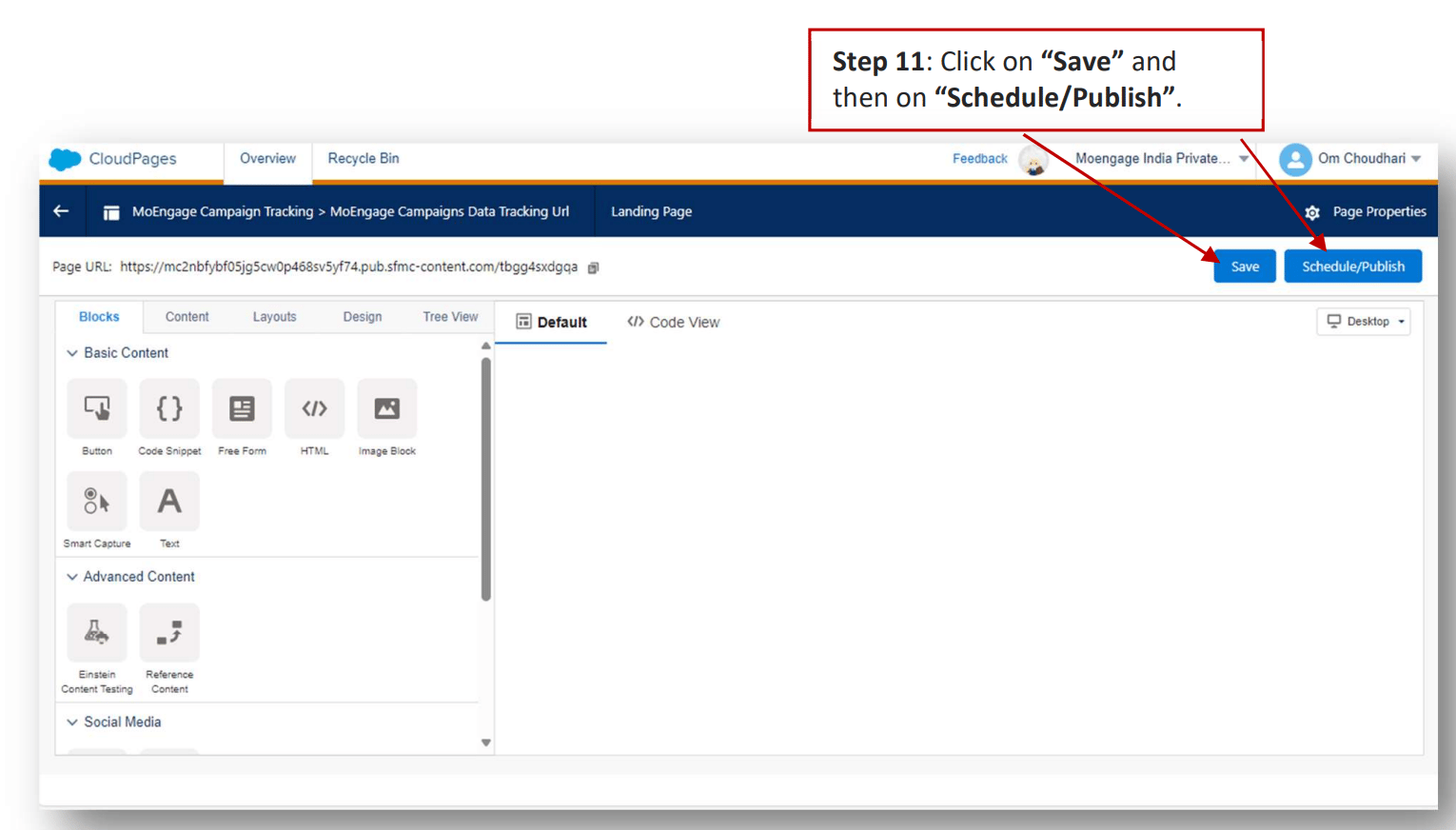
11. Click on "Save" and then on "Schedule/Publish".
    <img src="https://mintcdn.com/moengage-add-partner-guide-reddit-ads-conversions/Yi-RyjDepSuwBh9c/images/partner_36576013658900.png?fit=max&auto=format&n=Yi-RyjDepSuwBh9c&q=85&s=55e3b31cd12a8f2b320bffa82c32a2b9" alt="Saving and publishing the MoEngage Campaign Tracking CloudPage" width="1530" height="872" data-path="images/partner_36576013658900.png" />

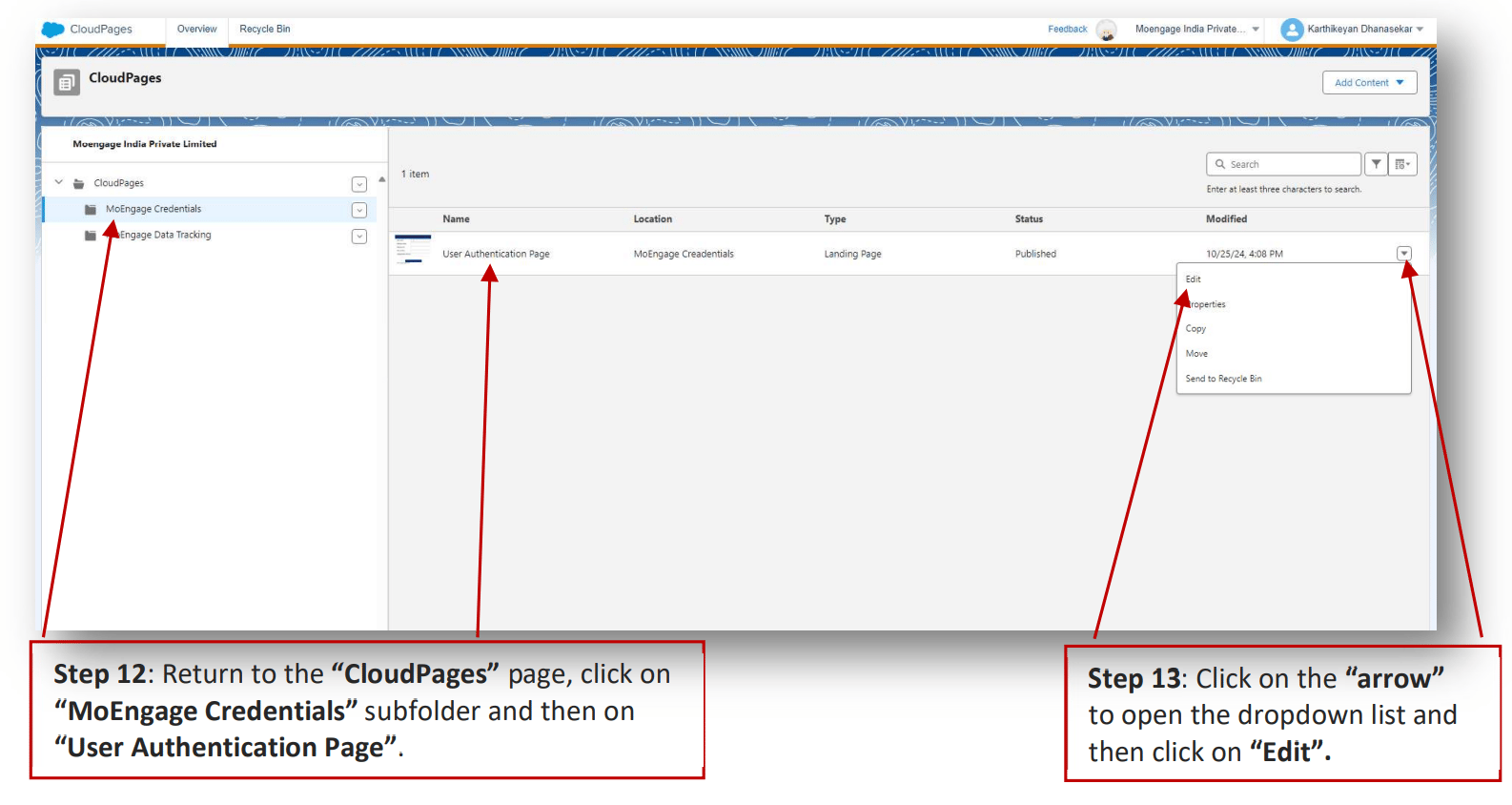
12. Return to the "CloudPages" page, click on "MoEngage Credentials" subfolder and then on "User Authentication Page".

13. Click on the "arrow" to open the dropdown list and then click on "Edit".
    <img src="https://mintcdn.com/moengage-add-partner-guide-reddit-ads-conversions/Yi-RyjDepSuwBh9c/images/partner_36576006451220.png?fit=max&auto=format&n=Yi-RyjDepSuwBh9c&q=85&s=fb2ac7a6ac7ba0d101593c0103648ef9" alt="Editing the User Authentication Page CloudPage" width="1586" height="844" data-path="images/partner_36576006451220.png" />

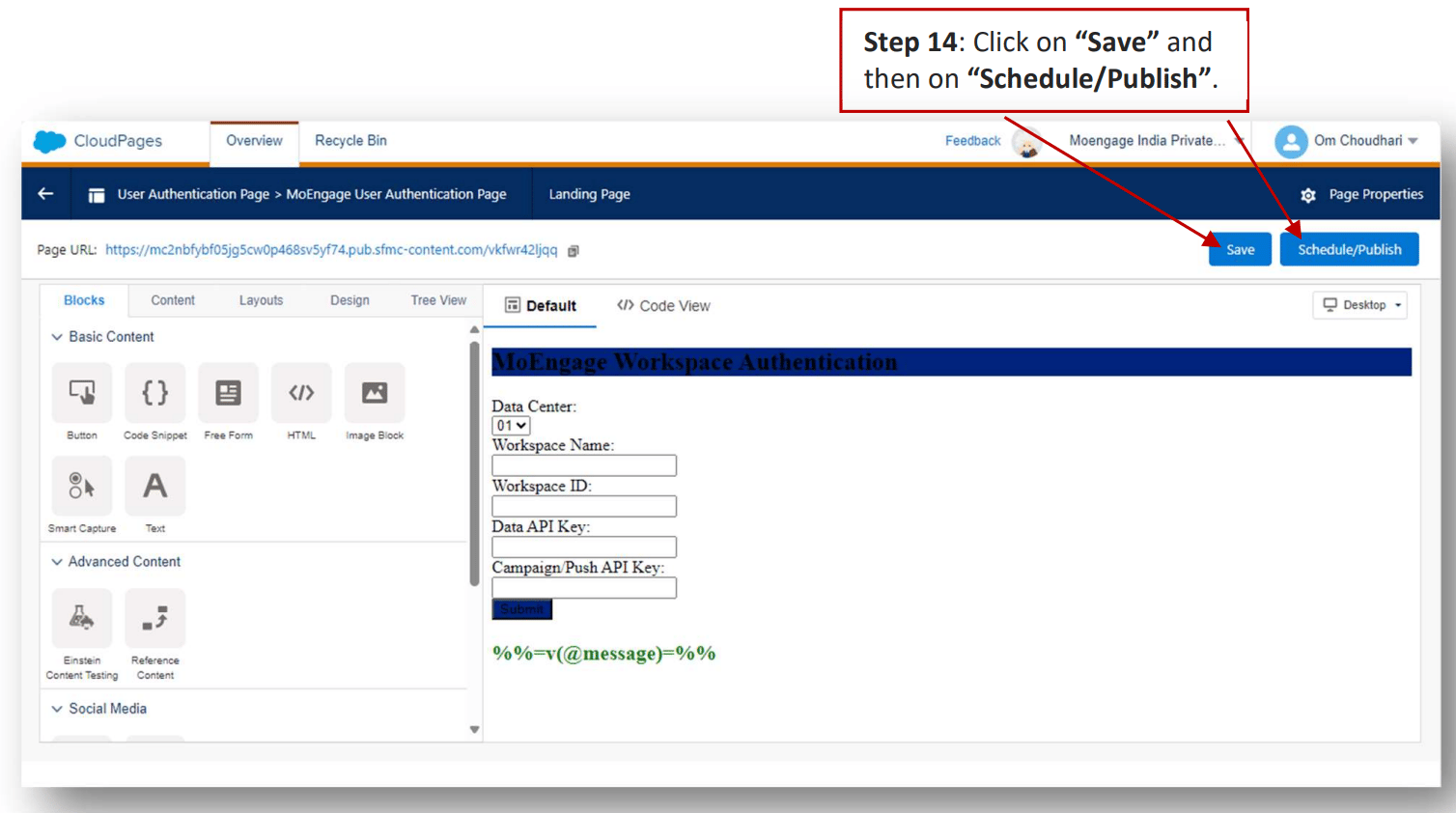
14. Click on "Save" and then on "Schedule/Publish".
    <img src="https://mintcdn.com/moengage-add-partner-guide-reddit-ads-conversions/Yi-RyjDepSuwBh9c/images/partner_36576013659540.png?fit=max&auto=format&n=Yi-RyjDepSuwBh9c&q=85&s=3a318544710c87fd4592741c77fa2199" alt="Saving and publishing the User Authentication Page" width="1508" height="842" data-path="images/partner_36576013659540.png" />

## Verify Data Extension and external keys

Ensure the following Data Extensions (DEs) are properly named and configured:

### A. MoEngage Tracking Data

It stores campaign tracking information.

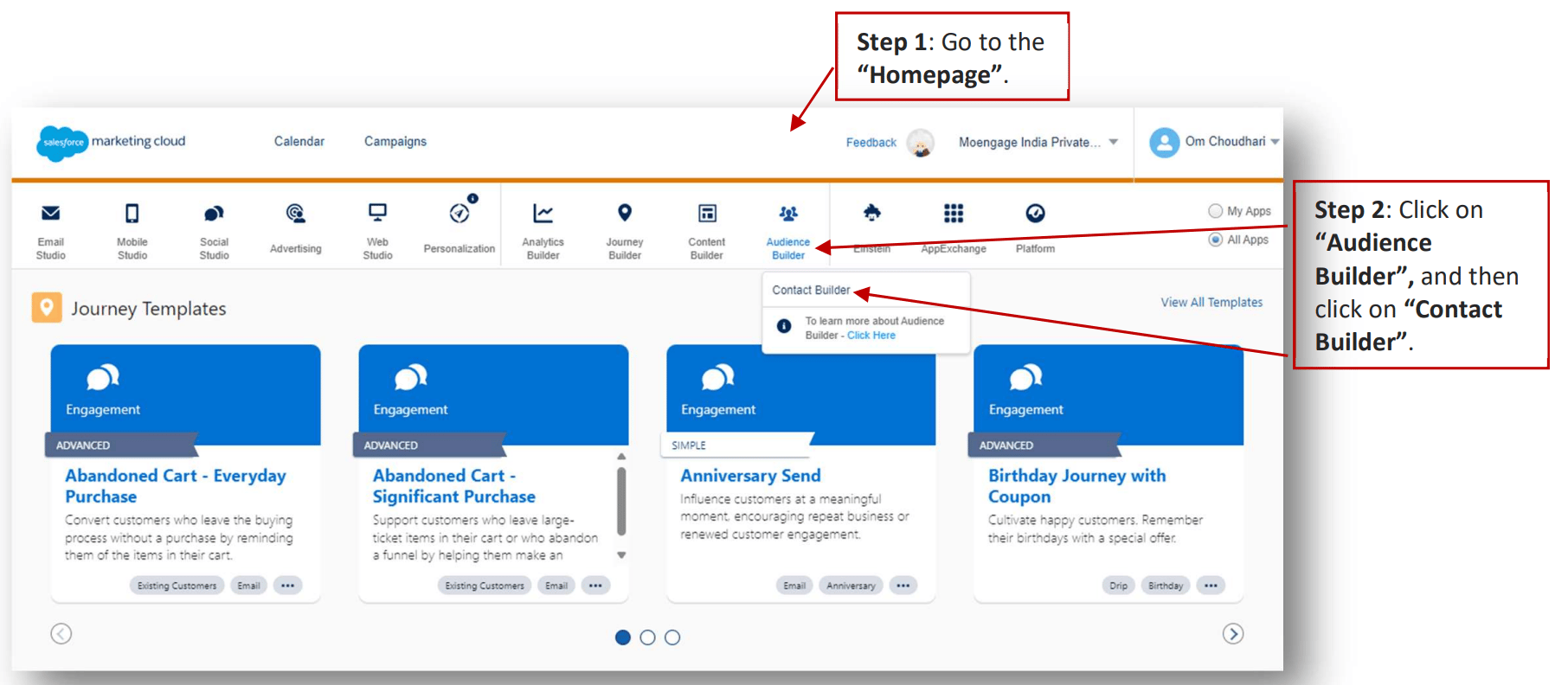
1. Go to the "Homepage".

2. Click on "Audience Builder", and then click on "Contact Builder".
   <img src="https://mintcdn.com/moengage-add-partner-guide-reddit-ads-conversions/Yi-RyjDepSuwBh9c/images/partner_36576006452372.png?fit=max&auto=format&n=Yi-RyjDepSuwBh9c&q=85&s=f4b8335732ccd6dfb45e8c44da518ebd" alt="Navigating to Audience Builder > Contact Builder" data-og-width="1812" width="1812" data-og-height="792" height="792" data-path="images/partner_36576006452372.png" data-optimize="true" data-opv="3" srcset="https://mintcdn.com/moengage-add-partner-guide-reddit-ads-conversions/Yi-RyjDepSuwBh9c/images/partner_36576006452372.png?w=280&fit=max&auto=format&n=Yi-RyjDepSuwBh9c&q=85&s=3bb9b3d5e3f8fef93b611aa6c1eba178 280w, https://mintcdn.com/moengage-add-partner-guide-reddit-ads-conversions/Yi-RyjDepSuwBh9c/images/partner_36576006452372.png?w=560&fit=max&auto=format&n=Yi-RyjDepSuwBh9c&q=85&s=53096fa3d3455319fd5c949e4e4806bb 560w, https://mintcdn.com/moengage-add-partner-guide-reddit-ads-conversions/Yi-RyjDepSuwBh9c/images/partner_36576006452372.png?w=840&fit=max&auto=format&n=Yi-RyjDepSuwBh9c&q=85&s=c7da81ca1c642a7d1e2717dd7cd97188 840w, https://mintcdn.com/moengage-add-partner-guide-reddit-ads-conversions/Yi-RyjDepSuwBh9c/images/partner_36576006452372.png?w=1100&fit=max&auto=format&n=Yi-RyjDepSuwBh9c&q=85&s=7bd2fb3538a7f53386041a7109a73d93 1100w, https://mintcdn.com/moengage-add-partner-guide-reddit-ads-conversions/Yi-RyjDepSuwBh9c/images/partner_36576006452372.png?w=1650&fit=max&auto=format&n=Yi-RyjDepSuwBh9c&q=85&s=0bd26ff31d0099f1394a2c9360944b92 1650w, https://mintcdn.com/moengage-add-partner-guide-reddit-ads-conversions/Yi-RyjDepSuwBh9c/images/partner_36576006452372.png?w=2500&fit=max&auto=format&n=Yi-RyjDepSuwBh9c&q=85&s=aca8240fbeff916c42fa76bf0e54ad3e 2500w" />

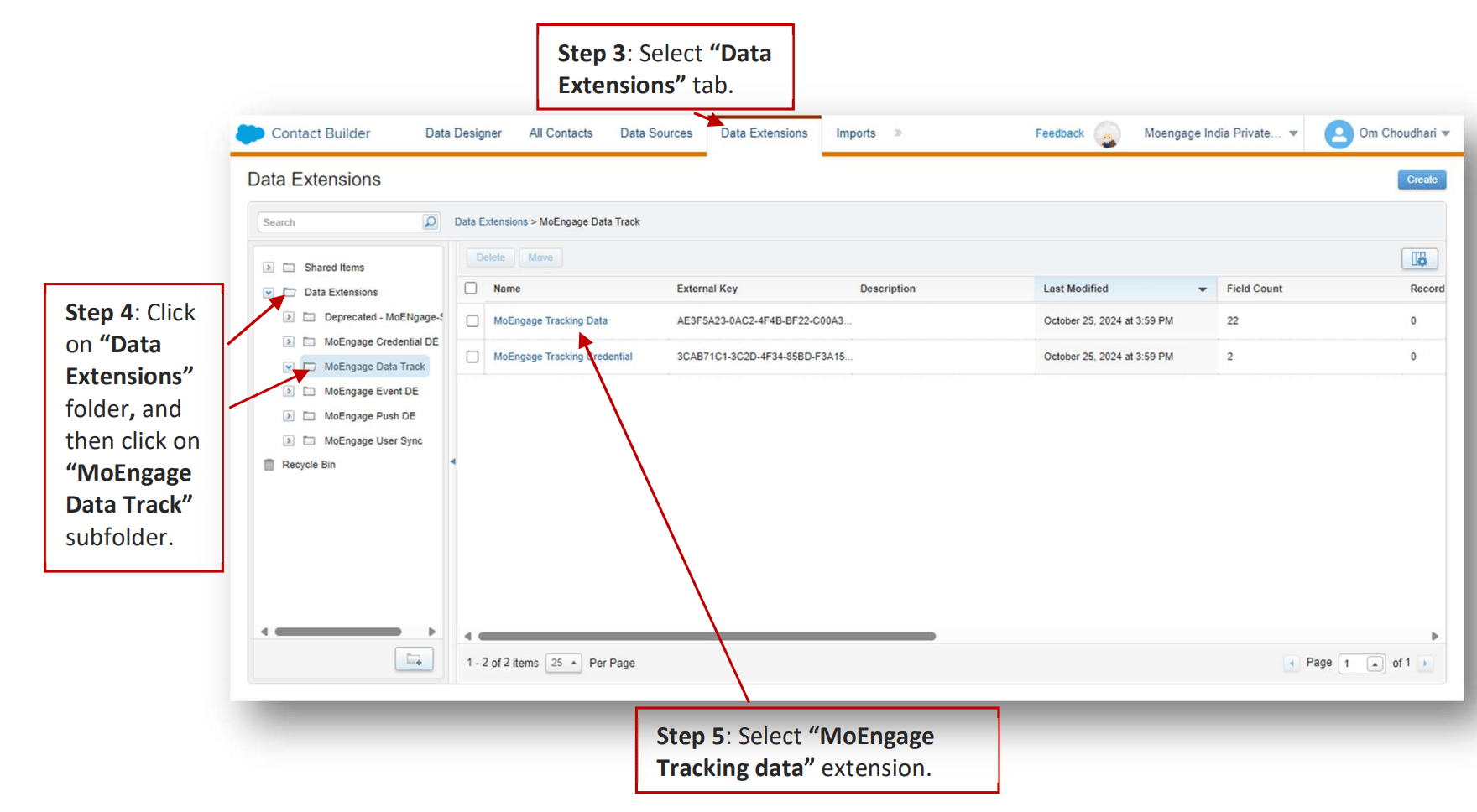
3. Select "Data Extensions" tab.

4. Click on "Data Extensions" folder, and then click on "MoEngage Data Track" subfolder.

5. Select "MoEngage Tracking data" extension.
   <img src="https://mintcdn.com/moengage-add-partner-guide-reddit-ads-conversions/Yi-RyjDepSuwBh9c/images/partner_36576013660052.png?fit=max&auto=format&n=Yi-RyjDepSuwBh9c&q=85&s=7a63e21e80686b6e642c468c382e6fb9" alt="MoEngage Tracking data Data Extension details" width="1760" height="968" data-path="images/partner_36576013660052.png" />

   Here you can find the "External Key". Please ensure it is accurate. \[Optional] If external key needs to be entered or changed, click on "External Key" input field, paste or enter the external key and click on "Done".

### B. MoEngage Credentials

It stores the credentials for the Data Tracking CloudPage:

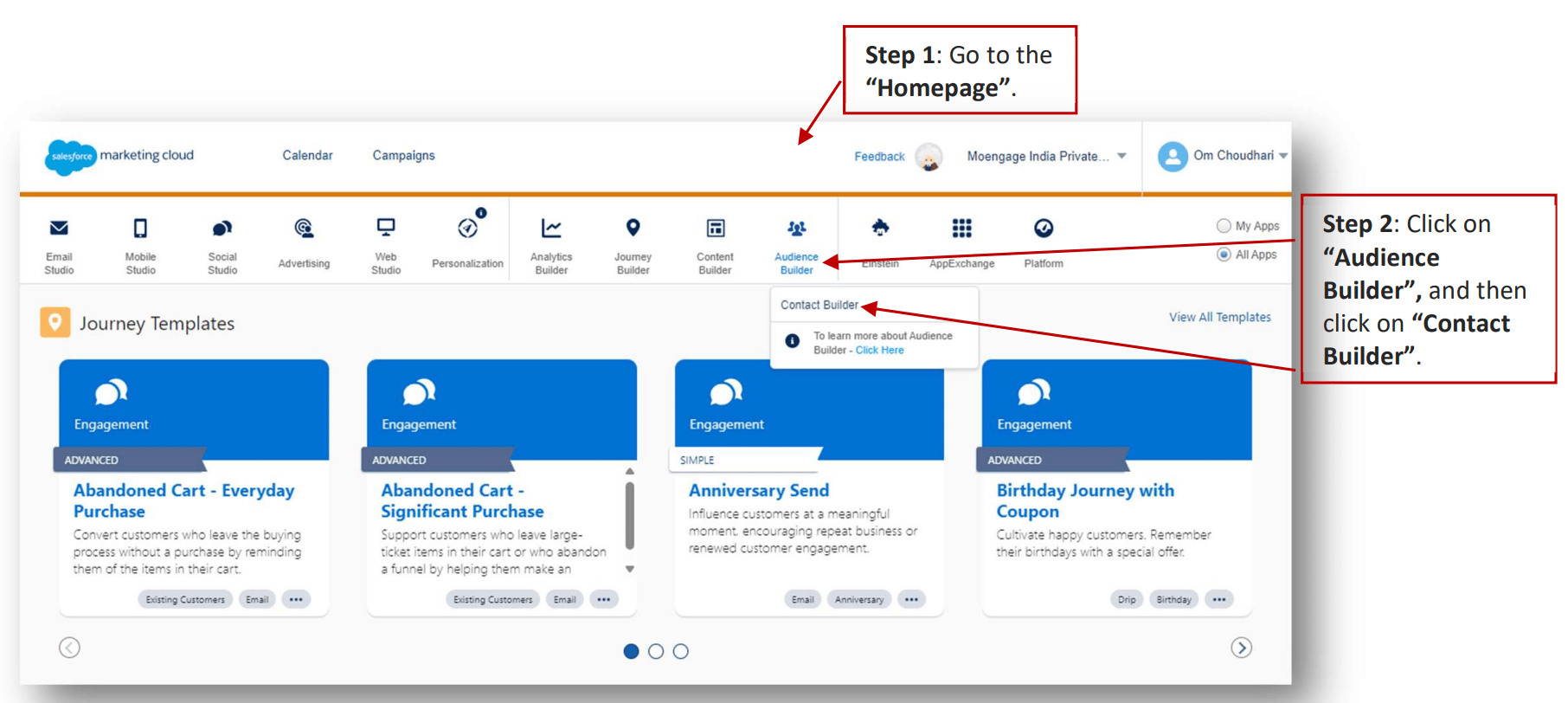
1. Go to the "Homepage".

2. Click on "Audience Builder", and then click on "Contact Builder".
   <img src="https://mintcdn.com/moengage-add-partner-guide-reddit-ads-conversions/Yi-RyjDepSuwBh9c/images/partner_36576013660564.png?fit=max&auto=format&n=Yi-RyjDepSuwBh9c&q=85&s=131b40c9b3666cedb92b0fbcfdd2daa8" alt="Navigating to Audience Builder > Contact Builder" data-og-width="1812" width="1812" data-og-height="812" height="812" data-path="images/partner_36576013660564.png" data-optimize="true" data-opv="3" srcset="https://mintcdn.com/moengage-add-partner-guide-reddit-ads-conversions/Yi-RyjDepSuwBh9c/images/partner_36576013660564.png?w=280&fit=max&auto=format&n=Yi-RyjDepSuwBh9c&q=85&s=d9ca559f3f4e39c95861a3a9f1c7e70e 280w, https://mintcdn.com/moengage-add-partner-guide-reddit-ads-conversions/Yi-RyjDepSuwBh9c/images/partner_36576013660564.png?w=560&fit=max&auto=format&n=Yi-RyjDepSuwBh9c&q=85&s=cd274cb34a42cbd4b12daf7875162fcd 560w, https://mintcdn.com/moengage-add-partner-guide-reddit-ads-conversions/Yi-RyjDepSuwBh9c/images/partner_36576013660564.png?w=840&fit=max&auto=format&n=Yi-RyjDepSuwBh9c&q=85&s=673ce93e21ff654464031e3ac8529016 840w, https://mintcdn.com/moengage-add-partner-guide-reddit-ads-conversions/Yi-RyjDepSuwBh9c/images/partner_36576013660564.png?w=1100&fit=max&auto=format&n=Yi-RyjDepSuwBh9c&q=85&s=d8aa7504d86656a000b1b1b053fb7ebb 1100w, https://mintcdn.com/moengage-add-partner-guide-reddit-ads-conversions/Yi-RyjDepSuwBh9c/images/partner_36576013660564.png?w=1650&fit=max&auto=format&n=Yi-RyjDepSuwBh9c&q=85&s=74c659e9a056327f2caff0f69ecdfa9c 1650w, https://mintcdn.com/moengage-add-partner-guide-reddit-ads-conversions/Yi-RyjDepSuwBh9c/images/partner_36576013660564.png?w=2500&fit=max&auto=format&n=Yi-RyjDepSuwBh9c&q=85&s=9f4b01aba44e385b905a5e2db6761808 2500w" />

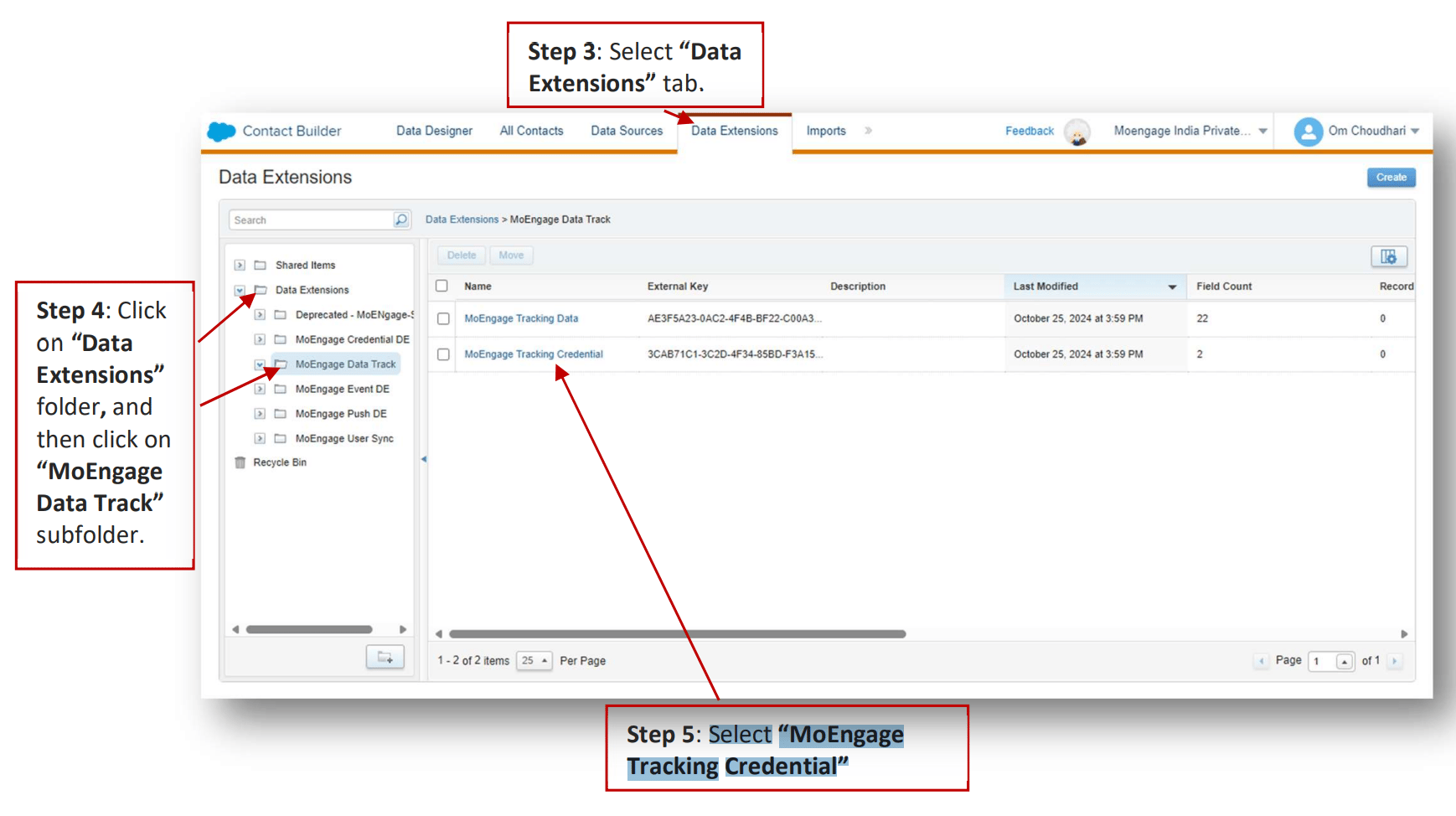
3. Select "Data Extensions" tab.

4. Click on "Data Extensions" folder, and then click on "MoEngage Data Track" subfolder.

5. Select "MoEngage Tracking Credential".
   <img src="https://mintcdn.com/moengage-add-partner-guide-reddit-ads-conversions/Yi-RyjDepSuwBh9c/images/partner_36576013660820.png?fit=max&auto=format&n=Yi-RyjDepSuwBh9c&q=85&s=dd30311eedc014b5fa5d57dc90249bfb" alt="MoEngage Tracking Credential Data Extension details" width="1738" height="974" data-path="images/partner_36576013660820.png" />

   Here you can find the "External Key". Please ensure it is accurate. \[Optional] If external key needs to be entered or changed, click on "External Key" input field, paste or enter the external key and click on "Done".

### C. MoEngage Event Activity Log

It logs Event Custom Activity information.

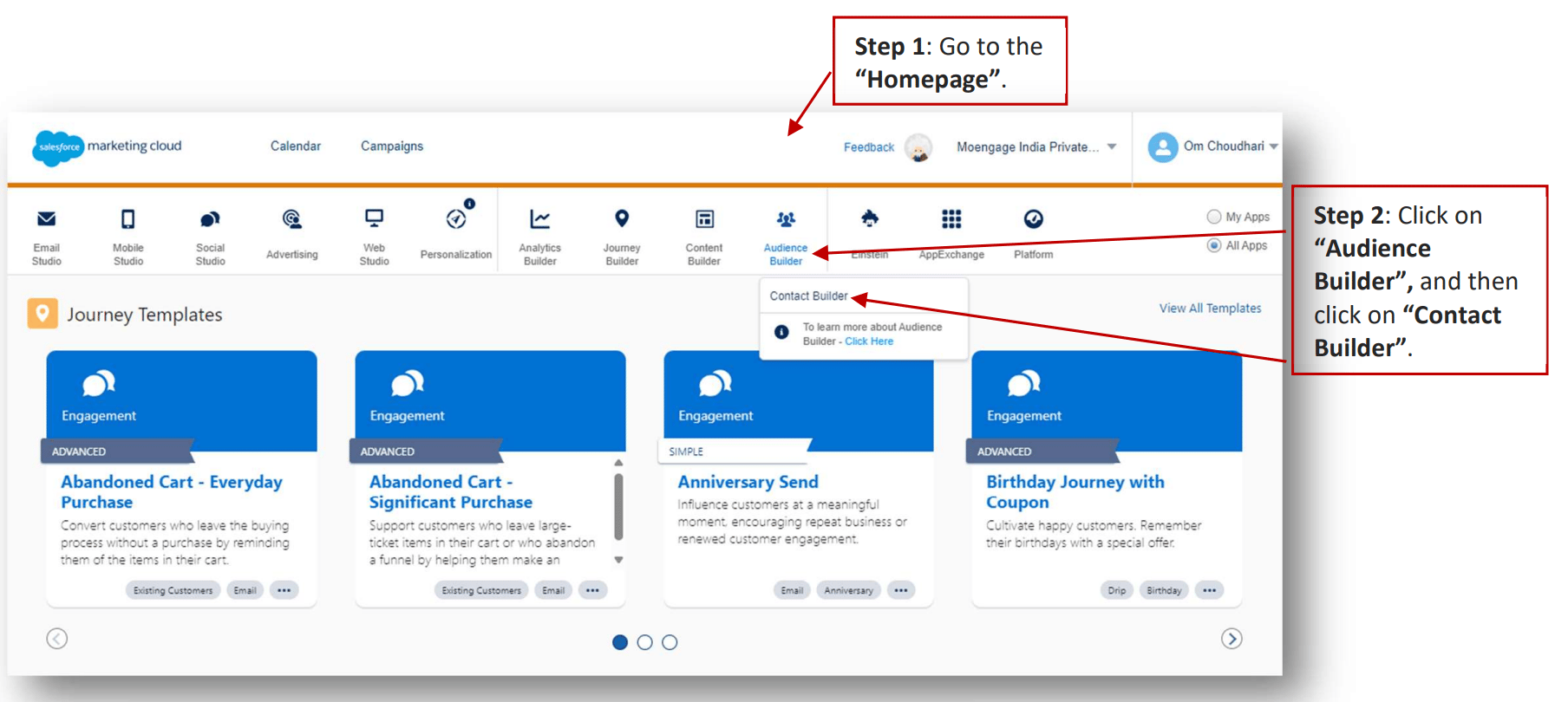
1. Go to the "Homepage".

2. Click on "Audience Builder", and then click on "Contact Builder".
   <img src="https://mintcdn.com/moengage-add-partner-guide-reddit-ads-conversions/Yi-RyjDepSuwBh9c/images/partner_36576006453524.png?fit=max&auto=format&n=Yi-RyjDepSuwBh9c&q=85&s=454349f2b34ccf659176ab22fea8fa3d" alt="Navigating to Audience Builder > Contact Builder" data-og-width="1808" width="1808" data-og-height="810" height="810" data-path="images/partner_36576006453524.png" data-optimize="true" data-opv="3" srcset="https://mintcdn.com/moengage-add-partner-guide-reddit-ads-conversions/Yi-RyjDepSuwBh9c/images/partner_36576006453524.png?w=280&fit=max&auto=format&n=Yi-RyjDepSuwBh9c&q=85&s=ac422355e538662b9e19675d077842db 280w, https://mintcdn.com/moengage-add-partner-guide-reddit-ads-conversions/Yi-RyjDepSuwBh9c/images/partner_36576006453524.png?w=560&fit=max&auto=format&n=Yi-RyjDepSuwBh9c&q=85&s=b05076ca0c324b16f3c1b62be6909e90 560w, https://mintcdn.com/moengage-add-partner-guide-reddit-ads-conversions/Yi-RyjDepSuwBh9c/images/partner_36576006453524.png?w=840&fit=max&auto=format&n=Yi-RyjDepSuwBh9c&q=85&s=119f8554fa5fe2b463c61c666ba0a4fd 840w, https://mintcdn.com/moengage-add-partner-guide-reddit-ads-conversions/Yi-RyjDepSuwBh9c/images/partner_36576006453524.png?w=1100&fit=max&auto=format&n=Yi-RyjDepSuwBh9c&q=85&s=860d3afe7e8e234b26ffb27f4845d7a1 1100w, https://mintcdn.com/moengage-add-partner-guide-reddit-ads-conversions/Yi-RyjDepSuwBh9c/images/partner_36576006453524.png?w=1650&fit=max&auto=format&n=Yi-RyjDepSuwBh9c&q=85&s=bc2168955eae65729072ec7f702b06bc 1650w, https://mintcdn.com/moengage-add-partner-guide-reddit-ads-conversions/Yi-RyjDepSuwBh9c/images/partner_36576006453524.png?w=2500&fit=max&auto=format&n=Yi-RyjDepSuwBh9c&q=85&s=81b0442422c23150a687dcc32326a776 2500w" />

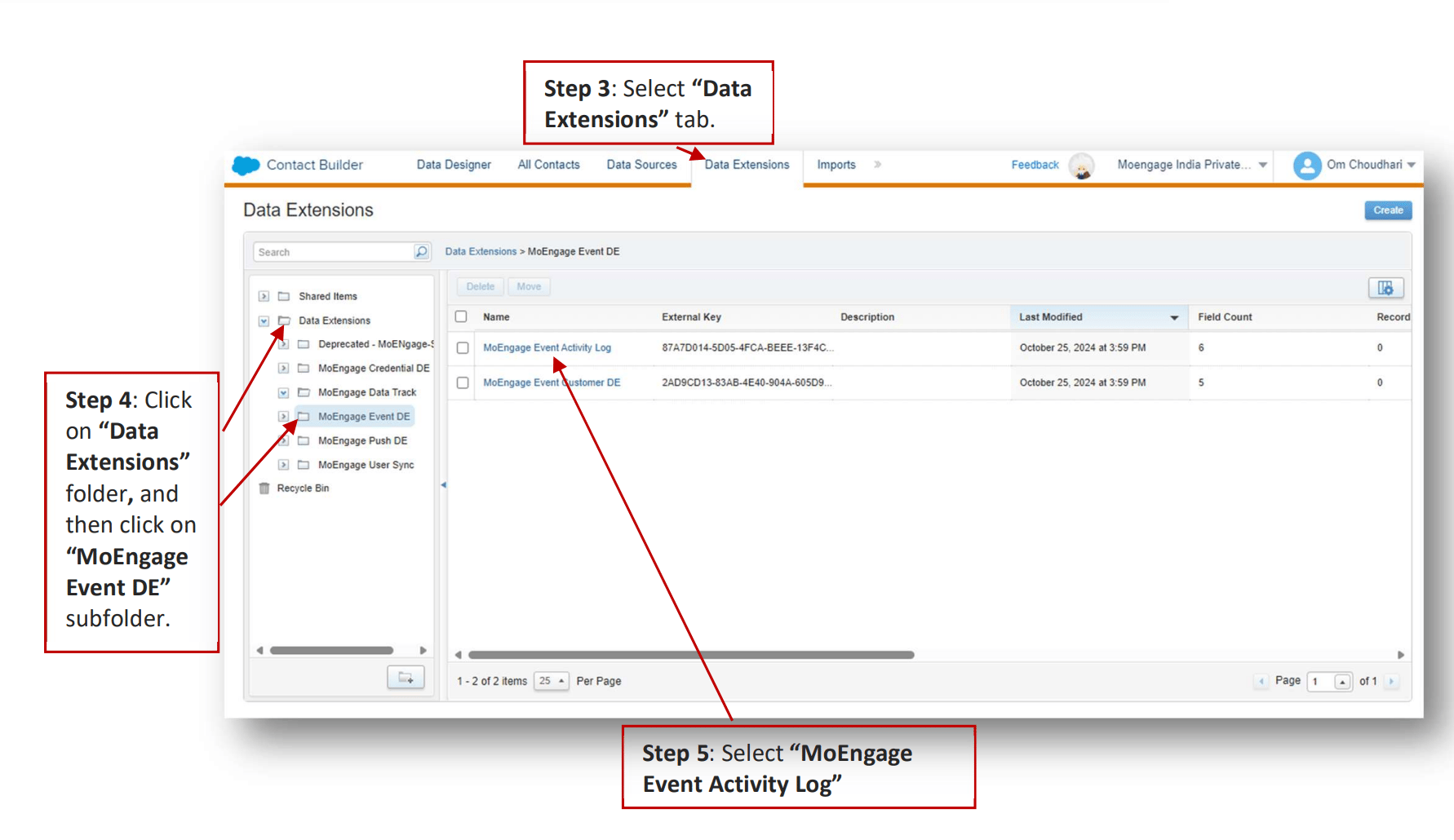
3. Select "Data Extensions" tab.

4. Click on "Data Extensions" folder, and then click on "MoEngage Event DE" subfolder.

5. Select "MoEngage Tracking Credential".
   <img src="https://mintcdn.com/moengage-add-partner-guide-reddit-ads-conversions/Yi-RyjDepSuwBh9c/images/partner_36576006453908.png?fit=max&auto=format&n=Yi-RyjDepSuwBh9c&q=85&s=c0ac18d6613579b10d62db61f1f27599" alt="MoEngage Event DE folder with Data Extensions" width="1782" height="1030" data-path="images/partner_36576006453908.png" />

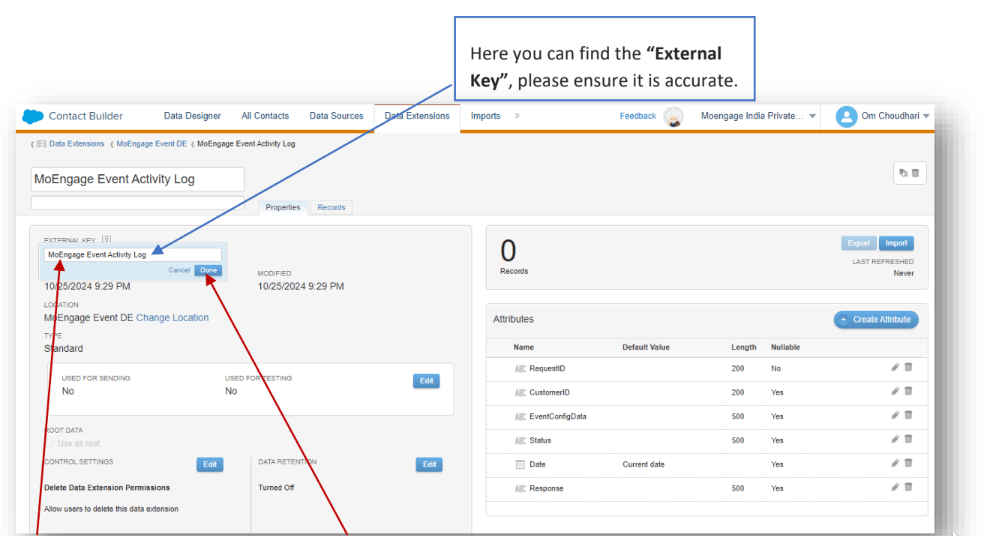
6. Select "MoEngage Event Activity Log".

   Here you can find the "External Key". Please ensure it is accurate. \[Optional] If external key needs to be entered or changed, click on "External Key" input field, paste or enter the external key and click on "Done".
   <img src="https://mintcdn.com/moengage-add-partner-guide-reddit-ads-conversions/-5eUtW0gyIWeVK2C/images/partner_43091841847828.png?fit=max&auto=format&n=-5eUtW0gyIWeVK2C&q=85&s=289a8dd53921b317385246372ed43349" alt="MoEngage Event Activity Log External Key field" width="1004" height="536" data-path="images/partner_43091841847828.png" />

### D. MoEngage Push Activity Log

It logs Push Custom Activity information.

1. Go to the "Homepage".

2. Click on "Audience Builder", and then click on "Contact Builder".

   <img src="https://mintcdn.com/moengage-add-partner-guide-reddit-ads-conversions/Yi-RyjDepSuwBh9c/images/partner_36576006453524.png?fit=max&auto=format&n=Yi-RyjDepSuwBh9c&q=85&s=454349f2b34ccf659176ab22fea8fa3d" alt="Navigating to Audience Builder > Contact Builder" data-og-width="1808" width="1808" data-og-height="810" height="810" data-path="images/partner_36576006453524.png" data-optimize="true" data-opv="3" srcset="https://mintcdn.com/moengage-add-partner-guide-reddit-ads-conversions/Yi-RyjDepSuwBh9c/images/partner_36576006453524.png?w=280&fit=max&auto=format&n=Yi-RyjDepSuwBh9c&q=85&s=ac422355e538662b9e19675d077842db 280w, https://mintcdn.com/moengage-add-partner-guide-reddit-ads-conversions/Yi-RyjDepSuwBh9c/images/partner_36576006453524.png?w=560&fit=max&auto=format&n=Yi-RyjDepSuwBh9c&q=85&s=b05076ca0c324b16f3c1b62be6909e90 560w, https://mintcdn.com/moengage-add-partner-guide-reddit-ads-conversions/Yi-RyjDepSuwBh9c/images/partner_36576006453524.png?w=840&fit=max&auto=format&n=Yi-RyjDepSuwBh9c&q=85&s=119f8554fa5fe2b463c61c666ba0a4fd 840w, https://mintcdn.com/moengage-add-partner-guide-reddit-ads-conversions/Yi-RyjDepSuwBh9c/images/partner_36576006453524.png?w=1100&fit=max&auto=format&n=Yi-RyjDepSuwBh9c&q=85&s=860d3afe7e8e234b26ffb27f4845d7a1 1100w, https://mintcdn.com/moengage-add-partner-guide-reddit-ads-conversions/Yi-RyjDepSuwBh9c/images/partner_36576006453524.png?w=1650&fit=max&auto=format&n=Yi-RyjDepSuwBh9c&q=85&s=bc2168955eae65729072ec7f702b06bc 1650w, https://mintcdn.com/moengage-add-partner-guide-reddit-ads-conversions/Yi-RyjDepSuwBh9c/images/partner_36576006453524.png?w=2500&fit=max&auto=format&n=Yi-RyjDepSuwBh9c&q=85&s=81b0442422c23150a687dcc32326a776 2500w" />

3. Select "Data Extensions" tab.

4. Click on "Data Extensions" folder, and then click on "MoEngage Push DE" subfolder.

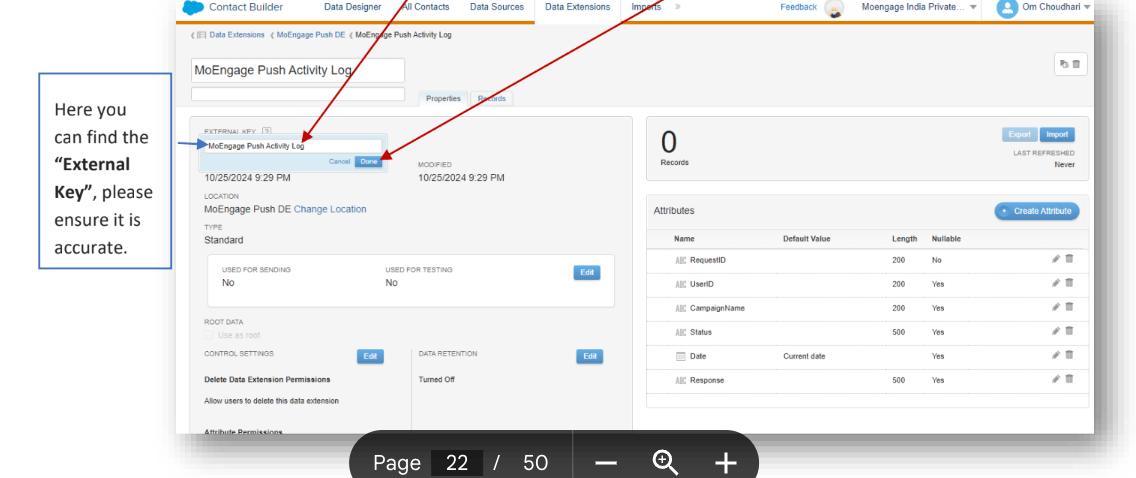
5. Select "MoEngage Push Activity Log".

   <img src="https://mintcdn.com/moengage-add-partner-guide-reddit-ads-conversions/Yi-RyjDepSuwBh9c/images/partner_36576006453908.png?fit=max&auto=format&n=Yi-RyjDepSuwBh9c&q=85&s=c0ac18d6613579b10d62db61f1f27599" alt="MoEngage Push DE folder with Data Extensions" width="1782" height="1030" data-path="images/partner_36576006453908.png" />

   Here you can find the "External Key". Please ensure it is accurate. \[Optional] If external key needs to be entered or changed, click on "External Key" input field, paste or enter the external key and click on "Done".
   <img src="https://mintcdn.com/moengage-add-partner-guide-reddit-ads-conversions/-5eUtW0gyIWeVK2C/images/partner_43091889316756.png?fit=max&auto=format&n=-5eUtW0gyIWeVK2C&q=85&s=31161500a2460eb7f386f5d404999425" alt="MoEngage Push Activity Log External Key field" width="1136" height="478" data-path="images/partner_43091889316756.png" />

## Configure Data Extension

### A. Configure Data Extensions

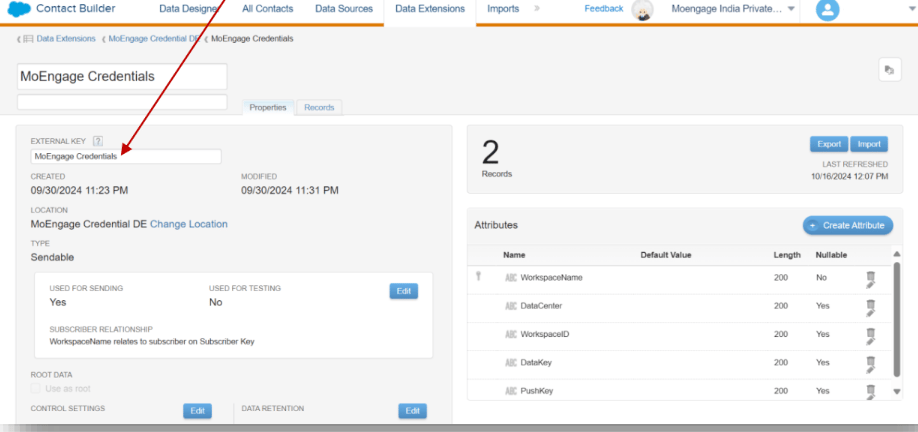
1. Change the external key of the credentials data extension from the solution package to "MoEngage Credentials".
   <img src="https://mintcdn.com/moengage-add-partner-guide-reddit-ads-conversions/-5eUtW0gyIWeVK2C/images/partner_43091841852564.png?fit=max&auto=format&n=-5eUtW0gyIWeVK2C&q=85&s=7736576dfc9c577e9a1d7961a02e722a" alt="Changing external key of the Credentials Data Extension" width="918" height="432" data-path="images/partner_43091841852564.png" />

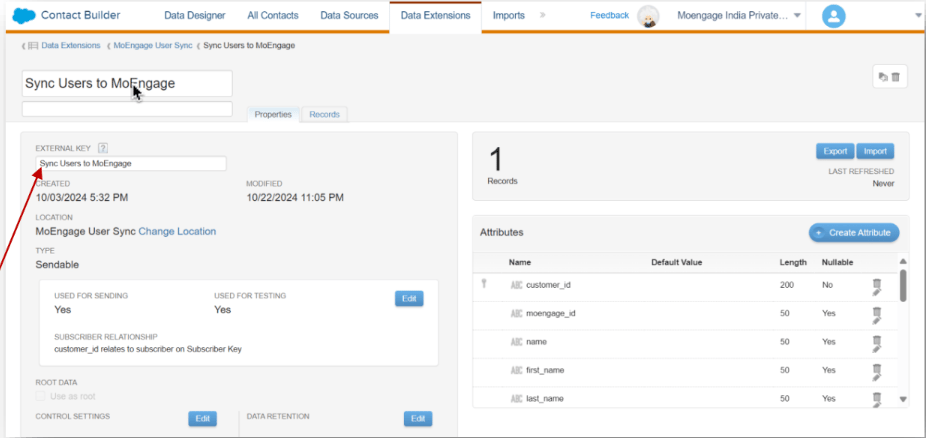
2. Change the external key of the "Sync Users to MoEngage" data extension from the solution package to "Sync Users to MoEngage".
   <img src="https://mintcdn.com/moengage-add-partner-guide-reddit-ads-conversions/-5eUtW0gyIWeVK2C/images/partner_43091889328020.png?fit=max&auto=format&n=-5eUtW0gyIWeVK2C&q=85&s=6c48e2c2d5ff00f1f0a66298142f7568" alt="Changing external key of the Sync Users to MoEngage Data Extension" width="926" height="438" data-path="images/partner_43091889328020.png" />

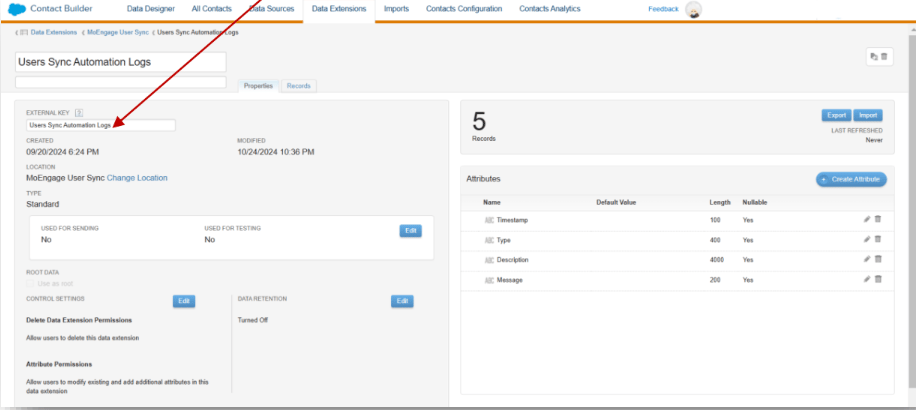
3. Change the external key of the "User Sync Automation Logs" data extension from the solution package to "User Sync Automation Logs".
   <img src="https://mintcdn.com/moengage-add-partner-guide-reddit-ads-conversions/-5eUtW0gyIWeVK2C/images/partner_43091841854484.png?fit=max&auto=format&n=-5eUtW0gyIWeVK2C&q=85&s=7cefda9446561f7d7b4b165f84e71d21" alt="Changing external key of the User Sync Automation Logs Data Extension" width="916" height="410" data-path="images/partner_43091841854484.png" />

## Connect your MoEngage workspace

### A. Access the credentials cloud page

On your SFMC dashboard, perform the following steps:

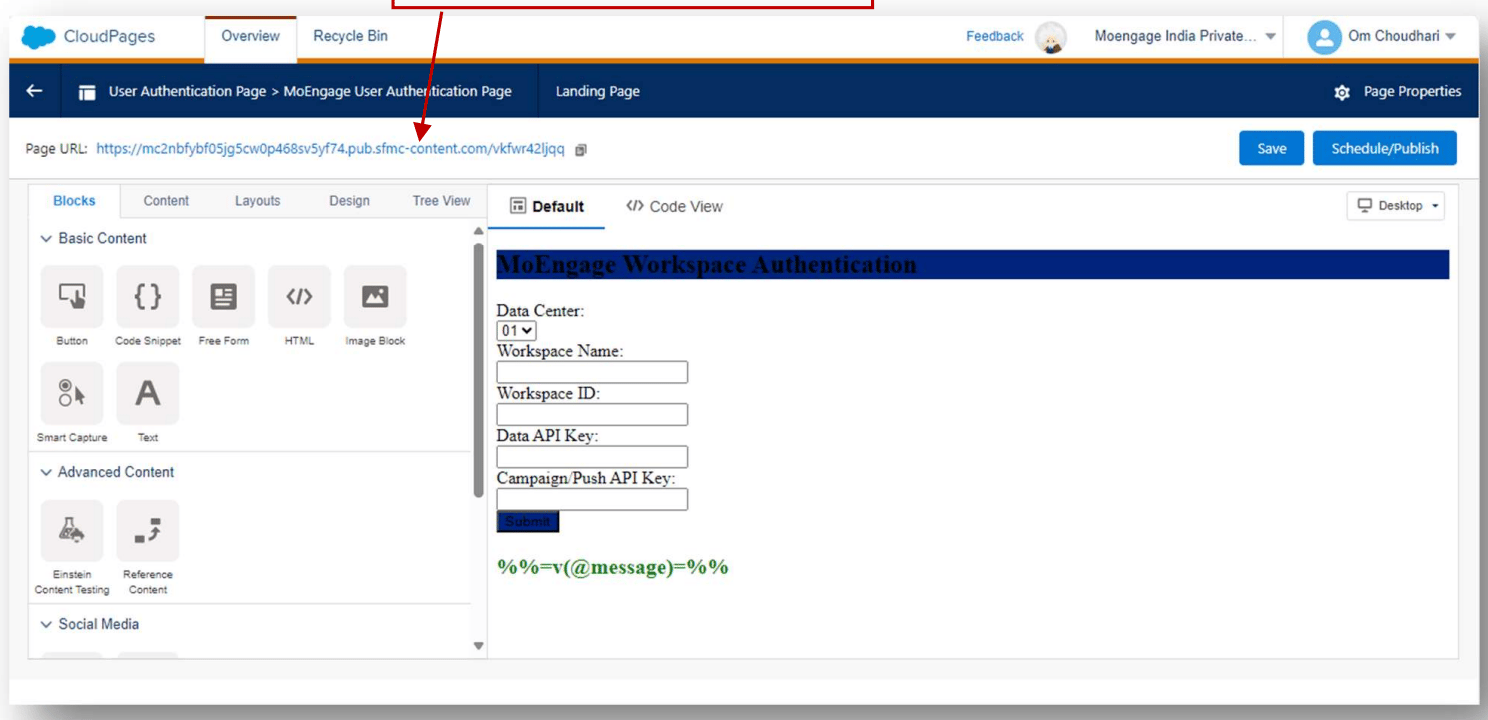
1. Navigate to "Web Studio" > "CloudPages" > "MoEngage Credentials" subfolder. Finally click on "MoEngage Authentication Page". Click Edit.

2. Click on the "Page URL" to open the Authentication Page.
   <img src="https://mintcdn.com/moengage-add-partner-guide-reddit-ads-conversions/Yi-RyjDepSuwBh9c/images/partner_36576013661716.png?fit=max&auto=format&n=Yi-RyjDepSuwBh9c&q=85&s=cf52b03e24bb36b62c7d2f4c5cc01002" alt="Opening the MoEngage Authentication Page URL" width="1488" height="720" data-path="images/partner_36576013661716.png" />

3. Enter details of your MoEngage workspace and click Submit.

| Field                   | Value                                                                                                                                                                   |
| ----------------------- | ----------------------------------------------------------------------------------------------------------------------------------------------------------------------- |
| Data center             | Select your MoEngage data center. Refer to [Data Centers in MoEngage](https://www.moengage.com/docs/user-guide/data/key-concepts/data-centers-in-moengage) for details. |
| Workspace Name          | Enter your workspace name. It is present in the header on your MoEngage dashboard. See the screenshot below.                                                            |
| Workspace ID            | Navigate to Settings > Accounts > APIs.                                                                                                                                 |
| Data API key            | Navigate to Settings > Accounts > APIs.                                                                                                                                 |
| Campaign (Push) API Key | Navigate to Settings > Accounts > APIs.                                                                                                                                 |

<img src="https://mintcdn.com/moengage-add-partner-guide-reddit-ads-conversions/Yi-RyjDepSuwBh9c/images/partner_36576013662100.png?fit=max&auto=format&n=Yi-RyjDepSuwBh9c&q=85&s=9e26ac509e0d7e9639c9f0c366027df2" alt="Workspace name displayed in the MoEngage dashboard header" width="2716" height="294" data-path="images/partner_36576013662100.png" />

<img src="https://mintcdn.com/moengage-add-partner-guide-reddit-ads-conversions/Yi-RyjDepSuwBh9c/images/partner_36576006455316.png?fit=max&auto=format&n=Yi-RyjDepSuwBh9c&q=85&s=831f7b4072f2e9ef077a28a4fb8df0cd" alt="Locating Workspace ID, Data API key, and Campaign API key in MoEngage Settings" width="1504" height="756" data-path="images/partner_36576006455316.png" />

\[Optional] After done, you can also validate if the newly added workspace is present in the Data Extension.